
What is a Google Ads Audit and Why is it Your Key to Higher ROI?

A Google Ads account audit is a systematic, step-by-step review of your campaigns, settings, and performance data to identify wasted spend, fix errors, and uncover opportunities for better results. It replaces guesswork with clear, data-backed decisions.
Key Components of a Google Ads Account Audit:
- Conversion tracking – Verify accurate measurement of results
- Campaign structure – Review organization and targeting settings
- Keywords and search terms – Identify wasted spend and negative keywords
- Ad copy and Quality Score – Assess relevance and performance
- Landing pages – Check message match and conversion optimization
- Budget allocation – Find where money is being wasted or underused
Many advertisers log into their Google Ads account and see clicks, impressions, and spend, but have no clear idea why performance is flat or declining. Research across thousands of accounts shows that most advertisers waste 61-76% of their ad budget on search terms that never convert. That means the majority of spend often goes to clicks that are unlikely to become leads or sales.
The problem usually is not Google Ads itself. The platform is complex, with hundreds of settings that interact in ways that are not always obvious. One misconfigured location setting, one missing negative keyword list, or one broken conversion tag can quietly drain your budget for months before anyone notices.
Regular audits are a structured way to prevent this waste. They help you spot issues before they become expensive problems, identify new keyword opportunities, improve your Quality Score, and ultimately get more conversions for less money. The goal is not a one-time perfect setup; it is continuous improvement and clear visibility into where every dollar goes.
I am Lior Krolewicz, a former Special Operations commander who now helps businesses stop wasting ad spend through systematic Google Ads account audits using a proprietary diagnostic framework developed over 15 years. I have personally audited hundreds of accounts and consistently found that most businesses are sitting on 30-50% more profit hidden in their existing campaigns. A disciplined audit process is often all that is needed to uncover it.
The High Cost of Neglect
When a Google Ads account has been running for a while, it is easy to fall into a pattern of small, reactive tweaks instead of stepping back and reviewing the strategy. Many marketing teams keep doing things “the way they have always done” even when results plateau, which can turn into silent budget leaks over time.
Inefficient campaigns and outdated settings often lead to missed conversions and significant waste. One industry analysis found that only 29% of Google Ads accounts track conversions accurately. That means 71% either have conversion tracking set up incorrectly or not at all. Without accurate tracking, decisions are based on partial or misleading data, making it nearly impossible to understand true ROI.
This kind of neglect is costly. Budget gets funneled into keywords, locations, or devices that are not driving profitable actions, while high-performing areas remain underfunded. Over months or years, this gap can add up to tens of thousands of dollars in lost profit.
The Benefits of a Proactive Audit
A proactive Google Ads account audit is like a structured health check for your campaigns. It gives you an objective look at what is working, what is broken, and where the biggest opportunities lie.
A well-executed audit will help you:
- Improve targeting: By reviewing every layer of your Google Ads setup, you gain a clear view of how each campaign, ad group, and keyword is performing. This makes it easier to focus spend on the right audiences and exclude low-intent traffic.
- Unearth new keywords: Auditing existing campaigns often reveals new, high-intent search terms hidden in the search terms report. These can become new keywords, ad groups, or even campaigns that bring in more relevant traffic and conversions.
- Improve Quality Score: An audit highlights where ad relevance, expected click-through rate (CTR), and landing page experience can be improved. Higher Quality Scores usually mean lower cost per click and better ad positions.
- Maximize budget efficiency: Regular reviews ensure your budget supports the campaigns and keywords that actually drive results. An audit pinpoints what to pause, what to scale, and where to reallocate spend for better efficiency.
- Gain a competitive edge: A structured PPC audit reveals strengths, weaknesses, and gaps that competitors may be missing. With that insight, you can refine your strategy to capture more impression share, improve profitability, and outperform rivals in your market.
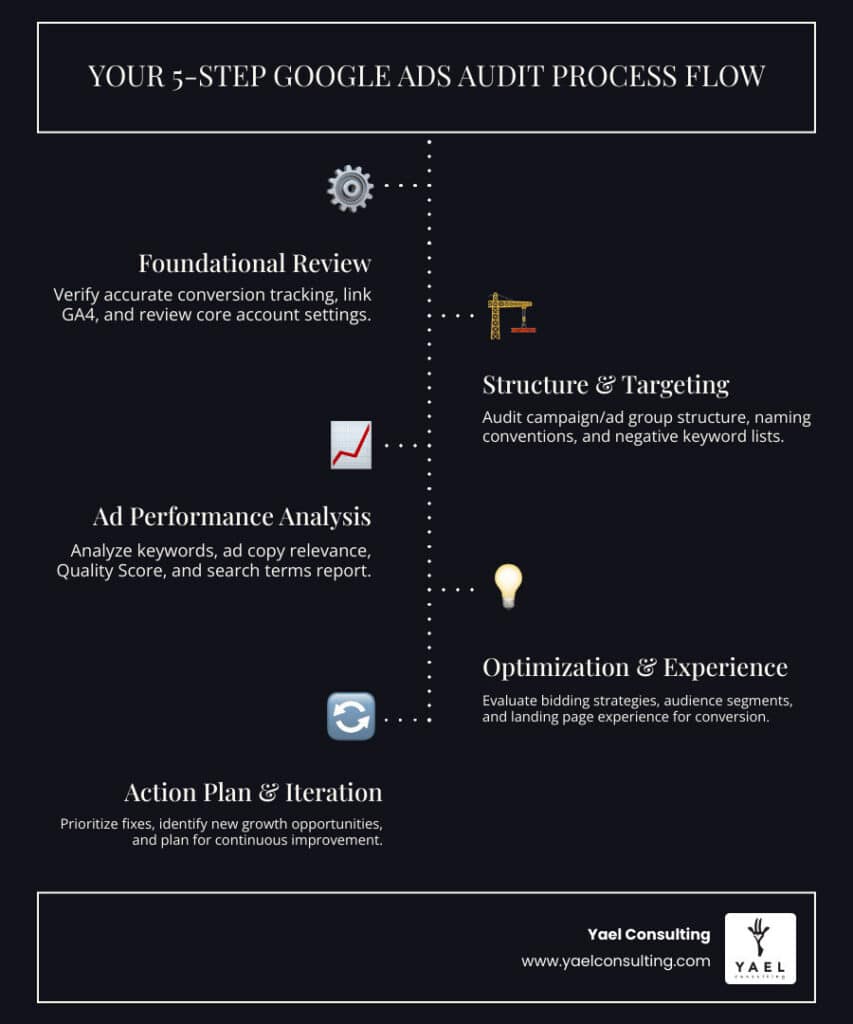
The Ultimate Step-by-Step Google Ads Account Audit Process

A thorough Google Ads account audit requires a systematic approach. This process moves from foundational elements to granular details so that every important setting and signal is checked, not just surface-level metrics.
Step 1: Foundational Review for Your Google Ads Account Audit
Before diving into performance metrics, you must ensure the bedrock of your account is solid.
- Account Goals: Start by clearly defining your business objectives. What counts as a meaningful conversion for your company? Are you optimizing for leads, sales, or qualified phone calls? Have these goals changed recently? Your goals guide every recommendation that follows.
- Conversion Tracking Accuracy: This is arguably the most critical step. If conversion tracking is not set up properly, most of your performance data loses context. Verify that conversions are being tracked accurately and attributed correctly. Confirm that conversion tags are placed on “thank you” or confirmation pages, not on product or form pages, so only completed actions are recorded. Tools like Google Tag Assistant can help validate correct installation.
- Linking Google Ads and GA4: Google Analytics 4 (GA4) is Google’s new measurement solution, and it replaced Universal Analytics. Make sure your Google Ads account is properly linked to GA4 so you can analyze user behavior, assist conversions, and full conversion paths rather than just last-click data.
- Campaign Naming Conventions: Check whether campaigns use a clear, consistent naming convention based on themes like product, service type, funnel stage, or geography. A well-organized account makes reporting, testing, and scaling much easier.
- Budget Settings: Review budget settings at the campaign level, including whether you use daily, lifetime, or shared budgets. Ensure budgets match your priorities and are not limiting high-performing campaigns while overfunding low performers.
- Location Targeting: Location settings have a major impact on performance. Confirm that your target locations and any excluded locations align with where your ideal customers are actually based. Also review whether you are targeting “Presence” only or “Presence or interest” and adjust to avoid irrelevant impressions.
Step 2: Auditing Campaign and Ad Group Structure
The way your account is structured directly affects control, relevance, and performance.
- Logical Campaign Structure: While there is no single perfect structure, campaigns should be segmented in a way that gives you control over budget, bids, and messaging. Common approaches include breaking campaigns out by product line, service category, intent level, or geographic region.
- Themed Ad Groups: An ad group contains one or more ads that target a shared set of keywords. Tightly themed ad groups (for example, all keywords around a specific service variation) make it easier to write highly relevant ads and improve Quality Scores.
- Single Keyword Ad Groups (SKAGs): In some cases, it can be useful to test SKAGs, where each ad group contains one highly specific keyword or close variants. This can improve control over bids, ad copy, and search term matching, which may result in higher CTRs, lower CPCs, and more efficient cost per acquisition.
- Keyword-to-Ad Group Relevance: Review whether each keyword in an ad group truly belongs with the others. If a keyword would be better served by a different ad message, it may need its own ad group.
- Branded vs. Non-branded Campaigns: Separate branded search campaigns from non-branded campaigns. Branded terms often have higher intent and lower CPCs, and splitting them out allows more accurate reporting and better budget control. It also helps you protect your brand searches from competitors who may bid on your name.
- Ad Group Keyword Limit (Under 20): As a general guideline, keep the number of keywords per ad group manageable. Many advertisers aim for no more than 10-20 closely related keywords per ad group to maintain strong relevance between searches, ads, and landing pages.
- Negative Keyword Lists: Negative keywords prevent your ads from showing on irrelevant queries. Review and expand negative keyword lists at the account, campaign, and ad group levels. Ensure that shared negative lists are applied correctly and that you are not blocking valuable traffic by mistake.
Step 3: Analyzing Keywords, Ad Copy, and Quality Score
This phase focuses on how well your keywords and ads align with user intent and how Google evaluates that alignment.
- Search Terms Report Analysis: The search terms report shows the actual queries that triggered your ads. Use it to identify irrelevant terms that are eating budget so you can add them as negatives. Also look for high-converting queries that deserve their own keywords or ad groups.
- Keyword Match Types: Review how you are using broad, phrase, and exact match. Broad match can help find new opportunities, but it should usually be paired with strong negatives and close monitoring. Exact and phrase match provide more control and can be used to protect high-intent terms.
- Identifying Negative Keywords: Even accounts that rely heavily on phrase or exact match typically need a negative keyword strategy. Use performance data and the search terms report to build comprehensive lists that reduce spend on low-intent or off-topic searches.
- Ad Copy Relevance: Evaluate each ad for relevance to its keywords and landing page. Ads should address the specific problem or desire behind the search and stay within Google’s editorial policies. Highlight unique selling points, offers, and differentiators.
- Compelling Call-to-Action (CTA): Confirm that each ad includes a clear, specific CTA such as “Get a Free Quote,” “Book a Demo,” or “Shop Now.” Vague CTAs can reduce engagement even when targeting and messaging are otherwise strong.
- Ad Extensions: Make sure all eligible campaigns use relevant ad extensions, such as sitelinks, callouts, structured snippets, and call extensions where appropriate. Extensions increase ad real estate and can improve CTR significantly.
- Ad Rank Explained: Ad rank is the value Google uses to determine whether your ads are eligible to show and in which position. It is influenced by your bid, Quality Score components, and the expected impact of assets like ad extensions.
- Quality Score Components: Google Ads Quality Score reflects how useful and relevant your ads and landing pages are for a given keyword. Break down Quality Score by campaign, ad group, and keyword, and focus on its three core components:
- Ad relevance: How closely your ad matches the intent behind a user’s search.
- Expected CTR: How likely your ad is to be clicked based on historical performance and competitive context.
- Landing page experience: How relevant, fast, and easy to use your landing page is for users who click your ad.
Step 4: Evaluating Landing Pages and Conversion Path

Landing pages sit outside of Google Ads, but they have a direct impact on your costs and your results. Even the best-managed campaigns will underperform if the traffic they drive lands on pages that do not convert.
- Message Match: Check that your ad promise and your landing page headline and content are tightly aligned. For example, an ad for “wooden toddler toys” should lead to a page that clearly features wooden toys for toddlers, not a generic toys category.
- Landing Page Relevance: Ensure that each landing page answers the main question or need behind the search. Visitors should immediately recognize that they are in the right place and see information matched to their intent.
- Mobile-Friendliness and Page Speed: Test your landing pages on multiple devices. Pages should load quickly and be easy to steer on mobile and desktop. Slow or clumsy pages often lead to high bounce rates and lower Quality Scores.
- Clear CTA: Every landing page should have a primary call to action that stands out visually and is easy to understand. Avoid clutter that distracts from that main action.
- Form Functionality: If you use forms, submit test entries to make sure they work correctly, are not overly long, and provide clear feedback on errors.
- Thank You Page Tracking: For form submissions, purchases, or other key actions, confirm that users are redirected to a unique “thank you” or confirmation page and that conversion tracking fires correctly there. This supports accurate reporting and better optimization.
Beyond the Basics: Advanced Audit Tactics & Tools
Once the fundamentals are solid, you can move into more advanced tactics to uncover additional growth opportunities and refine your Google Ads strategy.
Step 5: Advanced Tactics for Your Google Ads Account Audit
- Auction Insights Review: Use Google’s Auction Insights to see which competitors also appear for your key terms, including branded keywords. Metrics like impression share, overlap rate, and top of page rate help you understand your competitive position and where you may need to adjust bids or improve relevance.
- Bidding Strategy Review: Review whether you are using manual bidding, improved CPC, or automated smart bidding strategies. Check that your bidding approach aligns with your goals (such as target CPA or target ROAS) and that there is enough accurate conversion data to support automated strategies.
- Spending Allocation: Analyze how budget is distributed across campaigns, ad groups, and keywords. Shift spend away from consistently underperforming areas and toward segments with strong return on ad spend (ROAS) or cost per acquisition (CPA) metrics.
- Device Performance Analysis: Segment performance by device (desktop, mobile, tablet). If certain devices produce better conversion rates or CPAs, consider using bid adjustments or separate campaigns to capitalize on those trends.
- GA4 Audiences: Review and, where relevant, incorporate audiences from Google Analytics 4. You can recreate your UA audiences in GA4 or take advantage of GA4’s predictive capabilities to build audiences like likely purchasers or users at risk of churning. These audiences can be used for remarketing or bid adjustments.
- Google Shopping Product Feed Optimization: For e-commerce brands using Shopping campaigns, inspect your Google Merchant Center product feed. Ensure titles, descriptions, and attributes are accurate, compliant, and include relevant search terms. Clean, well-structured product data often improves visibility and performance.
Step 6: Essential Tools and a Final Checklist
To keep your Google Ads account audit organized and repeatable, use a simple checklist and a core set of tools.
- Essential Google Ads Audit Checklist:
- Conversion tracking setup and accuracy
- Account and campaign settings (budget, location, networks)
- Ad group structure (keyword themes, number of keywords)
- Keyword strategy (match types, negative keywords)
- Ad copy and assets (relevance, CTAs, extensions)
- Landing page experience (relevance, speed, mobile-friendliness)
- Quality Score analysis
- Bidding strategy and budget allocation
- Branded vs. non-branded campaign performance
- Competitor analysis (via Auction Insights)
- Device and channel performance
- GA4 audience integration
- Google Shopping feed optimization (if applicable)
- Change history review (to see past optimizations)
- Google Analytics: Google Analytics offers both paid and free versions to help advertisers analyze user behavior and campaign performance. It consolidates data in one place, making it easier to spot trends, diagnose issues, and evaluate the quality of traffic from Google Ads.
- Search Console: Connecting and reviewing Google Search Console data can provide additional insight into organic search queries, landing page performance, and technical issues. While it does not replace Google Ads reporting, it offers useful context when you assess search intent and on-site behavior.
- Heatmap Tools: Heatmaps and session recordings show how users interact with your landing pages. By seeing where visitors click, scroll, and drop off, you can identify obstacles in the conversion path and prioritize landing page improvements.
Frequently Asked Questions about Google Ads Audits
How often should I conduct a Google Ads audit?
Optimization is an ongoing process rather than a one-time task. A full, deep-dive Google Ads account audit is typically recommended on a quarterly or semi-annual basis, depending on your account size, complexity, and ad spend. In between, you should run lighter reviews of search terms, budget pacing, and key performance indicators weekly or bi-weekly to catch issues early.
What are the most common mistakes found during an audit?
During audits, several issues appear again and again:
- Incorrect Conversion Tracking: Only a minority of accounts track conversions accurately, which makes it hard to know true ROI or optimize smart bidding.
- Poor Account Structure: Disorganized campaigns and ad groups reduce control and make optimization more difficult.
- Overuse of Broad Match Keywords Without Negative Keywords: Without a solid negative keyword list, broad match can quickly spend budget on irrelevant or low-intent searches.
- Neglecting Landing Page Experience: Weak landing pages, slow load times, or poor message match hurt conversion rates and Quality Scores.
- Not Using Ad Extensions Effectively: Many accounts either do not use extensions or do not keep them updated, which limits visibility and potential CTR improvements.
Can I perform an audit myself or should I hire a professional?
You can perform a basic audit yourself if you have time, a clear checklist, and access to the right data. However, it can be challenging to stay objective when you are close to the account, and it is easy to overlook deeper structural issues or advanced opportunities.
Complex accounts or those with significant ad spend often benefit from an external perspective. Experienced specialists, like the team at Yael Consulting, bring proven frameworks and years of hands-on testing that help uncover issues and opportunities that are not always visible from the inside. A focused expert review can compress months of trial and error into a short, actionable analysis.
Take Control of Your Ad Spend Today
A Google Ads account audit is not a one-time task but an ongoing process. Each audit gives you a clearer picture of what is driving results, what is holding you back, and where your next round of improvements should focus.
When you treat audits as a regular part of your marketing rhythm, you turn raw data into a concrete action plan for profit growth. Over time, this cycle of review, adjustment, and testing helps transform wasted ad spend into a reliable, scalable channel for leads and sales.
At Yael Consulting, we focus exclusively on helping businesses get more from their Google Ads. With 15+ years of experience, one-client-per-market exclusivity, proprietary technology, and direct CEO involvement, we work with e-commerce and lead generation companies across the USA and Israel, including markets like New York and Los Angeles.
Ready to stop wasting ad spend and open up more profit from your existing traffic? Get your free, expert Google Ads audit from us today, and turn your account data into a practical, prioritized roadmap for growth.