
Why AdWords Manual Bidding Still Matters in 2026
AdWords manual bidding gives you direct control over the maximum amount you pay for each click on your ads, no algorithms, no guesswork, just you deciding what each keyword is worth to your business.
Here’s what you need to know quickly:
- What it is: You set a maximum cost-per-click (CPC) bid at the ad group or keyword level. Google will never charge you more than that amount per click.
- How it works: Your bid, combined with your Quality Score, determines your Ad Rank, which decides if and where your ad shows up.
- What you actually pay: Usually less than your max CPC. You only pay the minimum needed to beat the competitor below you.
- When to use it: New campaigns, tight budgets, niche markets, or when you need precise control over spend.
- When to skip it: Large campaigns with hundreds of keywords and strong conversion history, automated bidding may serve you better there.
Most advertisers default to Smart Bidding because Google pushes it hard. But automated strategies need data to work. Without enough conversions, they can burn your budget during the “learning phase” while delivering little in return.
Manual bidding puts you in the driver’s seat from day one. It takes more time and attention, but for the right campaigns, that control pays off.
I’m Lior Krolewicz, a Google Ads expert with over 15 years of experience helping businesses stop wasting ad spend and scale profitably through strategies like AdWords manual bidding. I’ve personally directed millions in Google Ads budgets across industries, and I’ll walk you through exactly how to make manual bidding work for your campaigns.
What is AdWords Manual Bidding and How Does It Work?
At its core, adwords manual bidding (specifically Manual CPC) is a method where we set the maximum amount we are willing to pay for a click. Unlike automated strategies that adjust bids in real-time based on thousands of signals, manual bidding relies on our own human intuition and business data.
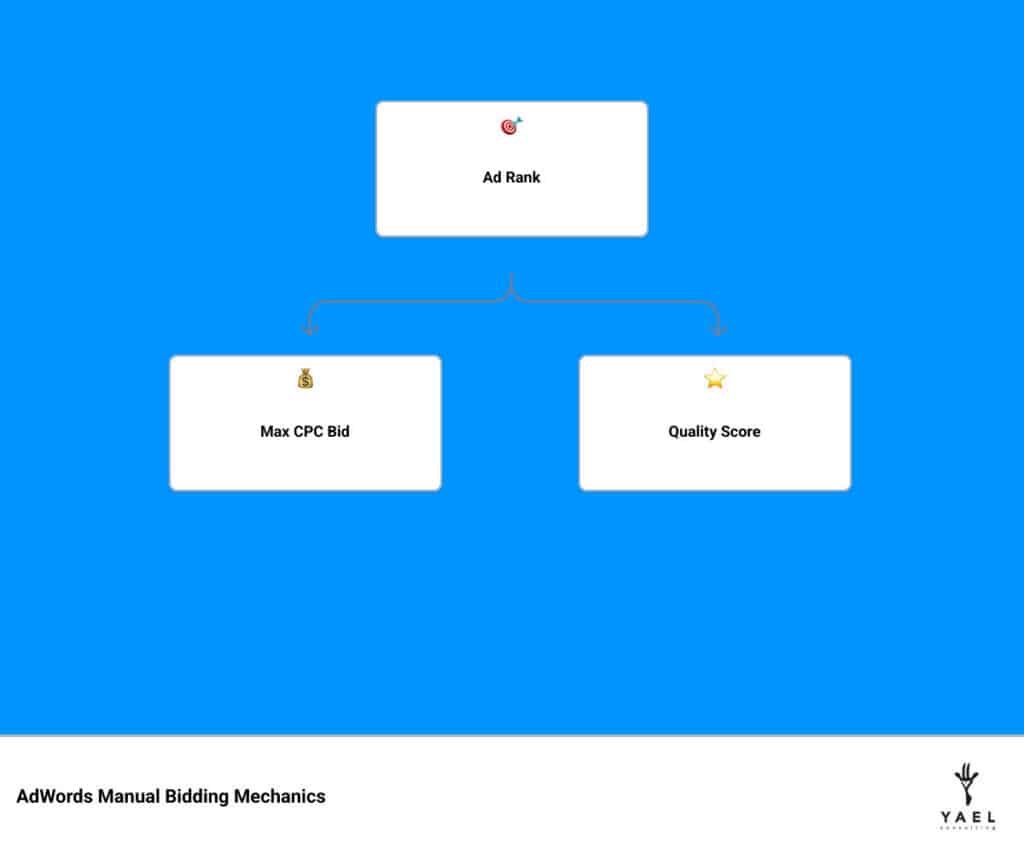
The mechanics revolve around three pillars: Max CPC, Quality Score, and Ad Rank. Your Ad Rank is essentially your “score” in the auction, calculated by multiplying your Max CPC bid by your Quality Score (a measure of your ad’s relevance and landing page quality).
According to official Google Ads documentation, you aren’t always charged your full Max CPC. Your actual CPC is the minimum amount required to beat the Ad Rank of the competitor immediately below you. Think of it like a silent auction where you only have to pay a penny more than the next highest bidder to win the spot.
| Feature | Manual CPC | Smart Bidding (Automated) |
|---|---|---|
| Control | Full control at keyword level | Google controls the bid |
| Data Required | Low (works with zero conversions) | High (needs 30-50 conversions/mo) |
| Time Investment | High (requires regular monitoring) | Low (set and forget) |
| Signals Used | Basic (Device, Location, Time) | Advanced (Browser, Language, Intent) |
| Best For | New accounts, niche products | Large e-commerce, high-volume leads |
Manual CPC vs. Enhanced CPC (eCPC)
For years, many of us used Enhanced CPC (eCPC) as a “halfway house.” It allowed us to set manual bids while letting Google’s machine learning raise or lower those bids by up to 30% if a click seemed likely to convert. However, the landscape has shifted. Google has phased out Enhanced CPC, following the complete sunset in March 2025.
As we navigate this post-eCPC environment, understanding advanced bidding techniques becomes vital. Without the “safety net” of eCPC, we must be more diligent in our manual bid settings. We can no longer rely on Google to automatically “fix” a low bid for a high-intent user; we have to ensure our base bids are competitive from the start.
How to Set Your Initial AdWords Manual Bidding Amounts
One of the most common questions we hear is: “What should my starting bid be?” If you bid too low, your ads won’t show. If you bid too high, you’ll burn through your budget before lunch.
When starting a new account, we recommend a three-step approach:
- Use Keyword Planner: Check the “top of page” and “first page” bid estimates. This gives you a ballpark of what competitors are paying.
- The $1 Rule: Many advertisers start with a baseline of $1.00 for non-competitive terms, but this varies wildly by industry. For a local plumber, $1.00 might not get you a single impression; for a niche blog, it might be plenty.
- The 20% Buffer: A great rule of thumb is to take the “estimated first-page bid” and add 20-30%. This ensures your ad actually appears during the initial testing phase so you can gather data.
When to Choose Manual Bidding Over Automation
Google loves to tell us that “automation is superior,” but that’s only true if the machine has enough data to learn from. If your campaign receives fewer than 15-30 conversions per month, the algorithm is essentially guessing.
We suggest choosing adwords manual bidding in these scenarios:
- New Campaigns: You have no historical data, and you want to see which keywords actually drive traffic before letting an AI take over.
- Data Scarcity: If you sell high-ticket items (like $5,000 diamond rings) where conversions are rare but valuable, manual control is safer.
- Niche Markets: In markets with very low search volume, automated signals are often “noisy” and unreliable.
- Budget Precision: When every dollar counts and you cannot afford the “learning phase” swings that come with automated strategies.

Benefits of AdWords Manual Bidding for Small Budgets
For small businesses, manual bidding is a shield. Automated strategies like Target CPA often require a daily budget that is at least 5-10x your target CPA. If you want leads at $50 but only have $20 a day to spend, automation will fail.
Manual bidding allows for granular oversight. You can decide that “Keyword A” is worth $2.00 because it leads to sales, while “Keyword B” is only worth $0.50 because it’s just for brand awareness. This level of CPA/CPC/CPM solution ensures you aren’t overpaying for low-value traffic.
Strategic Control for High-Value Keywords
Some keywords are “crown jewels.” If you are a laptop repair shop in New York, the keyword “laptop repair center New York” is significantly more valuable than “how to fix a laptop.” With manual bidding, you can manage high CPCs by aggressively bidding on the high-intent terms while pulling back on the educational ones. This protects your impression share where it matters most.
Step-by-Step: Setting Up and Editing Your Bids
Ready to take the wheel? Here is how you navigate the Google Ads interface to enable manual bidding:
- Select your Campaign: Click the “Settings” icon in the left-hand menu.
- Open Bidding: Click the “Bidding” section to expand it.
- Change Bid Strategy: Click “Change bid strategy” and select “Manual CPC” from the dropdown menu. (Note: You may have to click “Or, select a bid strategy directly” to see the manual option).
- Save: Once saved, you can now edit your bids at the Ad Group or Keyword level.
Optimizing AdWords Manual Bidding with Bid Adjustments
Manual bidding doesn’t mean you have one static bid for everyone. You can use bid adjustments to fine-tune your reach. Since 61.9% of Google ad clicks occur on smartphones, mobile optimization is no longer optional.
We use bid modifier best practices to adjust for:
- Devices: Increase bids by 20% for mobile if that’s where your leads come from.
- Location: Bid higher for New York or Los Angeles if those cities have higher conversion rates.
- Ad Schedule: If your shop is closed on Sundays, use a custom ad schedule to decrease bids by 90% during off-hours.
- Demographics: Adjust bids based on age or household income to reach your ideal customer.
Managing Negative Keywords and Search Terms
A manual bidder’s best friend is the Negative Keyword list. Because you are paying for every click, you must ensure those clicks are relevant. Google recommends having at least 3 negative keywords in each ad group to filter out “junk” traffic.
For example, if you sell “luxury watches,” you should add “cheap,” “free,” and “repair” as negative keywords. This relevance optimization ensures your manual bids are only spent on people ready to buy. For more complex setups, you might even use rule-based bidding to automate the pausing of low-performing terms.
Advanced Optimization and Performance Reviews
Manual bidding is not “set it and forget it.” To win, you need a regimented review calendar. We recommend using specific lookback windows to avoid making emotional decisions based on a single bad day.
- Weekly: Review keywords with high spend and no conversions. Adjust bids by 10-15%.
- Monthly: Analyze device and location performance. Apply bid adjustments.
- Quarterly: Perform a deep dive into “silent thief” keywords—those that look okay week-to-week but have a terrible ROI over 90 days.
Avoiding Common Manual Bidding Mistakes
Even pros make mistakes. Here are the “landmines” to watch out for:
- Rash Adjustments: Don’t lower a bid just because you didn’t get a sale yesterday. Making rash adjustments based on immediate, thin data can kill a winning campaign.
- The “Silent Thief”: These are keywords that get a few clicks every day but never convert. Individually they cost pennies, but over six months, they can steal thousands of dollars.
- Ignoring Quality Score: You can’t just “bid your way” to the top. If your Quality Score is a 2/10, you’ll pay 400% more than a competitor with a 10/10.
Using Data to Refine Your Strategy
To truly master adwords manual bidding, you must become comfortable with the math. Use the Google Bid Simulator to see how a $0.50 increase might impact your traffic. Always keep an eye on your performance metrics. If your Cost Per Acquisition (CPA) is rising, it’s time to trim the fat from your keyword list or lower your Max CPCs.
Frequently Asked Questions about Manual Bidding
How do I decide on the right CPC bid amount?
Base your bid on the value of a customer. If a lead is worth $100 to you, and your website converts 5% of visitors, you can afford to pay up to $5.00 per click ($100 * 0.05). Always consult a guide to budgets to ensure your daily spend aligns with your goals.
Can I use Manual CPC with Smart Bidding?
Technically, no—they are separate strategies. However, you can use a hybrid approach. You might start a campaign on Manual CPC to gather 30-50 conversions, then “promote” it to a Target CPA strategy once the machine has enough data to be effective.
Why is conversion tracking essential for manual bidding?
Without conversion tracking, you are flying blind. You might be bidding $10 on a keyword that brings in thousands of visitors but zero sales. Tracking allows you to justify every cent of your manual bid by tying it directly to revenue.
Conclusion
Mastering adwords manual bidding is about taking accountability for your results. While Google’s AI is powerful, it lacks the context of your specific business goals, your profit margins, and your local market nuances. By combining human strategy with manual control, you can often outperform even the most sophisticated algorithms—especially in the early stages of a campaign.
At Yael Consulting, we believe in the “Art and Science” of Google Ads. As a boutique agency with over 15 years of expertise, we specialize in driving significant sales and profit growth through direct involvement and proprietary technology. We don’t just “set and forget”; we provide one-client-per-market exclusivity to ensure your success is our only priority.
Ready to see what you’re missing? We offer a free, actionable 15-minute Google Ads analysis with guaranteed value. Let us show you how to optimize your bidding strategy for maximum ROI.