
E-commerce PPC: Your Secret Weapon for Online Retail Success

Why PPC is a Game-Changer for Online Stores
PPC for e-commerce is a digital advertising model where online retailers pay a fee each time someone clicks their ad. Here’s what you need to know:
- Pay only for results: You’re charged when someone clicks, not just when they see your ad.
- Immediate traffic: Your products can appear at the top of search results within hours instead of waiting months for organic rankings.
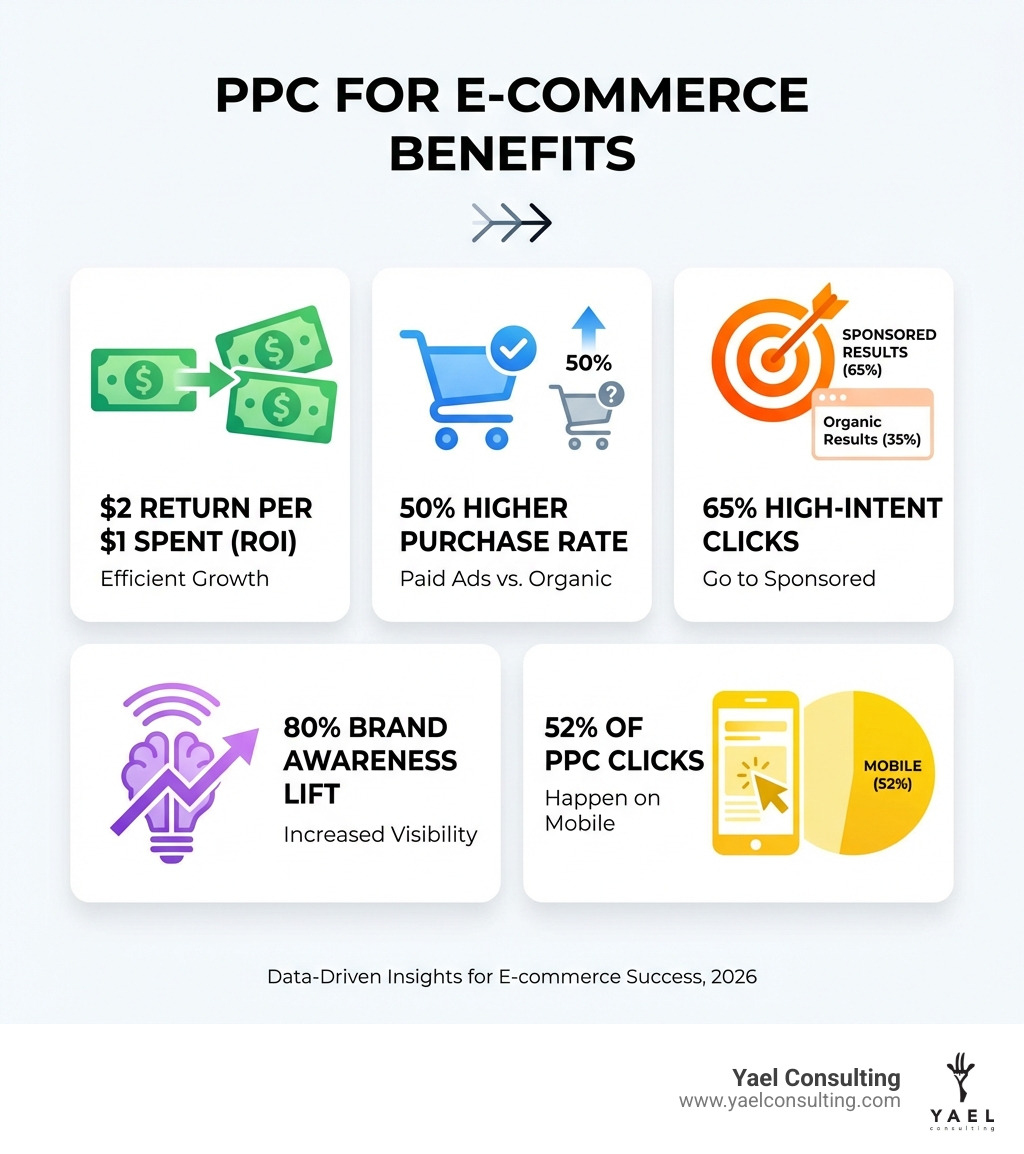
- High-intent buyers: Visitors from paid ads are 50% more likely to purchase than those from organic links.
- Predictable growth: Set daily budgets and measure exact returns on every dollar spent.
- Multi-platform reach: Run campaigns on Google, Facebook, Instagram, TikTok, and Microsoft Ads.
Imagine launching a PPC ad campaign for your online store, confident it will boost traffic and conversions. You set it up, let it run, and expect sales to follow. A few weeks later, you check back. After spending thousands on ads, you have few conversions to show for it and no meaningful revenue increase.
Without proper strategy and optimization, this happens all too often.
The good news? When done right, businesses make $2 for every $1 spent on PPC advertising. Google’s own data shows an even better return: $8 in profit for every $1 spent on Google Ads. That’s an 800% ROI.
PPC isn’t just about driving clicks. It’s about:
- Capturing high-intent searches when buyers are ready to purchase.
- Building brand awareness (lifts by an average of 80%).
- Remarketing to visitors who left without buying.
- Getting immediate feedback on what products and messaging resonate.
For searches with high buying intent, sponsored results get 65% of the clicks, while organic results only get 35%. If you’re not using PPC, you’re missing the majority of your potential customers.
Over 80% of businesses now rely on PPC for growth. Mobile devices drive 70% of search ad impressions and 52% of all PPC clicks. Your customers are searching and clicking on their phones, ready to buy.
I’m Lior Krolewicz, an ex-Special Ops commander turned Google Ads expert who has helped businesses direct millions in advertising dollars profitably. Over 15 years, I’ve specialized in PPC for e-commerce, building proprietary systems that fix and optimize campaigns in days instead of weeks, turning wasted ad spend into predictable profit.
Building Your Winning PPC for e-commerce Strategy
A successful PPC for e-commerce strategy starts with clear objectives and a solid understanding of how paid advertising fits into your overall marketing efforts. Instead of throwing money at ads and hoping for the best, we build a precision-tuned engine designed to convert browsers into loyal customers.
First, we need to define our goals. Are we aiming to:
- Drive direct sales and revenue?
- Generate leads for high-value products or services?
- Increase website traffic and brand awareness?
For most e-commerce businesses, the primary goal is the sale of a good or service. This means our PPC campaigns will be heavily focused on conversion.
Next, we establish a budget. A common approach is to work backward from a target Cost Per Acquisition (CPA) – how much we can afford to spend to acquire one customer profitably. We’ll dive deeper into budgeting later, but remember, PPC allows us to set a maximum monthly budget and only pay for ads that are clicked. This helps us avoid wasting budget on impressions that never attract engagement.
When choosing platforms, Google Ads holds an 87% market share of all PPC advertising, making it an essential starting point for most e-commerce businesses. However, we also consider other platforms like Microsoft Advertising, Amazon, and social media networks such as Facebook, Instagram, and TikTok, especially for niche audiences or different stages of the customer journey. Google Ads is the undisputed champion for capturing demand (people actively searching), while platforms like Facebook and Instagram are particularly effective at creating demand (introducing products to new audiences).
It’s also important to understand how PPC for e-commerce differs from Search Engine Optimization (SEO) and how they can work together.
| Feature | PPC for E-commerce | SEO for E-commerce |
|---|---|---|
| Speed of Results | Immediate visibility, clicks within hours | Long-term, can take months to years for ranking |
| Cost | Pay per click, budget control, variable cost | No direct cost per click, but requires investment in content, technical optimization |
| Control | Full control over ad copy, targeting, budget, and placement | Limited control over rankings and exact placement |
| Targeting | Highly precise (keywords, demographics, interests, location) | Relies on algorithms, broader targeting |
| Visibility | Top of search results, display networks, social feeds | Organic search results, below paid ads |
| Data & Feedback | Immediate, granular data on performance, conversions, ROI | Slower feedback, less direct attribution |
| Flexibility | Easily adjustable campaigns, ad copy, bids | Slower to react to market changes |
| Brand Awareness | Lifts brand awareness by an average of 80% | Builds long-term authority and trust |
| Purchase Intent | Captures high-intent searches, visitors 50% more likely to purchase | Attracts both high and low-intent traffic |
| Synergy | Complements SEO by capturing immediate demand and testing keywords | Benefits from PPC data, provides long-term, sustainable traffic |
PPC and SEO are not rivals; they are partners. While SEO builds long-term authority, PPC captures immediate demand. In fact, 89% of the traffic generated by search ads is not replaced by organic traffic when ads are paused. This highlights the distinct value of PPC.
Keyword Research: The Foundation of PPC for e-commerce
Keyword research is the absolute heart of any PPC for e-commerce campaign. Ad networks use keywords to determine when to display your ads. We want to ensure our ads appear for people actively searching for what we sell. This means understanding buyer intent.
We start by brainstorming every possible way someone might search for our products. We consider:
- Seed keywords: Broad, general terms (e.g., “running shoes”).
- Long-tail keywords: More specific phrases with lower search volume but higher buyer intent (e.g., “running shoes for endurance” or “best sports shoes of 2023”). These often convert better because they indicate a more specific need.
We also focus on keywords with clear commercial intent. These include terms like “buy,” “for sale,” “discount,” “price,” “shop,” or “where to buy.” Someone searching for “buy noise-canceling headphones” is much closer to a purchase than someone searching for “how do noise-canceling headphones work.”
Tools like Google’s Keyword Planner are invaluable. They help us by showing a keyword’s monthly search volume, competitiveness, and the bid range for top-of-page display. We can also use it to find new keyword ideas and analyze which terms competitors are likely bidding on. By understanding broader market trends, we can refine our own keyword strategy.
The Crucial Role of Negative Keywords
Just as important as choosing the right keywords is identifying the wrong ones. This is where negative keywords come in. These are terms or phrases that we exclude from our campaigns to prevent our ads from showing for irrelevant searches.

Why are they crucial? Because irrelevant clicks cost money without leading to sales. For example, if we sell luxury handbags, we’d want to add “cheap,” “discount,” or “affordable” as negative keywords to avoid showing our ads to bargain hunters. Similarly, an e-commerce brand selling athletic apparel might designate “Nike” as a negative keyword to ensure ads don’t appear when users search for Nike products. This saves our budget and improves our ad relevance.
We regularly review our search query reports – a list of the actual search terms people used that triggered our ads – to identify new negative keyword opportunities. This ongoing process ensures we’re constantly refining our targeting and preventing wasted ad spend. It helps us remove vague or unqualified queries early and ensure our ads are only shown to genuinely interested potential customers.
Crafting and Launching High-Impact Campaigns
Once we have our keywords sorted, it’s time to build our campaigns. A strong campaign structure is vital for success and directly impacts our Quality Score – a metric from 1-10 that measures the relevance of our ads, keywords, and landing pages. A higher Quality Score means lower costs and better ad positions.
We organize our keywords into tightly themed ad groups. This means grouping similar keywords together. For instance, if we sell “men’s running shoes,” “men’s leather boots,” and “men’s casual sneakers,” we’d create separate ad groups for each category rather than lumping them all together. This ensures maximum relevance between the search query, our ad, and the landing page.
A best practice is to mirror our website’s navigation or product categories in our campaign structure. This logical organization helps us maintain relevance and manage our campaigns more effectively. Messy, disorganized campaign structures lead to low relevance, and Google responds with a low Quality Score.
Mastering Google Shopping and Product Feeds
For e-commerce businesses selling physical products, Google Shopping Ads (also known as Product Listing Ads or PLAs) are essential. They showcase product images, prices, and product details directly within search results, providing users with key information upfront. Google Shopping Ads generate as much as 60% more clicks than regular PPC ads for e-commerce sites, and visitors from paid ads are 50% more likely to purchase.
Unlike traditional search ads, Google Shopping campaigns don’t rely on keywords that we bid on. Instead, they are powered by a product feed housed within the Google Merchant Center. This feed is a file containing detailed, accurate, and up-to-date information about all our products (titles, descriptions, prices, images, availability, GTINs, MPNs).
Setting up our Google Merchant Center account involves:
- Claiming and verifying our website URL.
- Meeting the Merchant Center guidelines (e.g., clear return policies, secure checkout).
- Setting our tax and shipping settings.
The product feed is where the magic happens. We need to ensure it’s carefully optimized:
- High-quality images: Clear, professional images are crucial because they are often the first thing users notice.
- Accurate pricing: Prices must match our website exactly.
- Product titles: These are the most vital piece of product listings. We optimize them with relevant keywords first (e.g., “Brand Name | Product Type | Key Feature”) to increase clicks by up to 9.6x.
- GTINs (Global Trade Item Numbers) & MPNs (Manufacturer Part Numbers): These unique identifiers help Google categorize our products correctly. If our product has an assigned GTIN (like a UPC or EAN), we include it. If not, we use the MPN or set ‘identifier_exists’ to ‘false’ for custom goods.
We can use feed rules in Merchant Center to optimize our product data, fill missing information, create custom labels for bidding strategies, and ensure we meet all of Google’s requirements for every feed. We recommend setting up an upload schedule to submit our full product feed at least every 30 days, or up to four times a day if our inventory changes frequently.
Optimizing Ad Copy and Visuals for PPC for e-commerce
Our ad copy and visuals are our digital handshake with potential customers. They need to be compelling enough to grab attention and drive clicks.
Ad Copy Best Practices:
- Unique Selling Propositions (USPs): What makes our product or store stand out? (e.g., “Free Shipping,” “Lifetime Warranty,” “24/7 Customer Support”).
- Benefit-driven copy: Focus on the outcome or benefit for the customer, not just features. Instead of “500GB SSD,” try “Blazing-Fast Storage for Instant Load Times.”
- Strong Calls to Action (CTAs): Tell users exactly what to do (e.g., “Shop Now,” “Get 20% Off,” “Order Today”).
- Responsive search ads: For text ads, we provide multiple headlines and descriptions, and the platform generates combinations based on user context to “personalize” the ad.
- Mirror search queries: If someone searches for “viking t-shirts,” our ad copy should ideally include “Viking T-shirts.”
Visuals for Display and Social Media Ads:
- High-quality images and videos: Visually appealing ads typically receive more clicks than text-only ads. Videos can show products in action or convey a brand’s feel.
- Brand consistency: Use consistent logos, color schemes, and visual elements across all ads.
- Ad extensions: These are free and increase our ad’s real estate on the search results page. We use sitelink extensions to direct users to specific product categories, callout extensions to highlight USPs, price extensions to show product costs, and promotion extensions for sales.
Designing Landing Pages That Convert
Even the most brilliant ad copy and visuals are wasted if the landing page isn’t optimized. The landing page is where the conversion happens, so it must be built for performance.
Essential elements of an optimized e-commerce landing page:
- Message match: The content of the landing page must directly align with the ad that brought the user there. If an ad promotes “summer sneakers,” the landing page should feature summer sneakers, not the homepage.
- Clear, single CTA: Make it easy for customers to purchase. A prominent “Add to Cart” button or “Buy Now” is essential. Avoid clutter that distracts from the main goal.
- Optimizing for page speed: Slow loading pages kill conversions. We ensure our pages load quickly across all devices.
- Mobile-first design: With 52% of all PPC ad clicks happening on a phone, our landing pages must be responsive and provide an excellent user experience on mobile devices.
- Social proof: Including customer reviews, testimonials, or trust badges builds confidence and encourages purchases.
An attractive, conversion-optimized landing page also makes it easy for our customers to purchase our goods by including a CTA, such as an option to add an item to a shopping cart. We can also set up the URL to have an Urchin Tracking Module, which tracks how visitors interact with the page.
Measuring, Optimizing, and Scaling for Profitability
PPC for e-commerce is not a “set it and forget it” strategy. It requires ongoing management, monitoring, and optimization to ensure profitability.
When we launch new campaigns, they typically go through a “learning phase” where the ad platform’s algorithms gather data and adjust. During this time, it’s crucial to be patient and avoid making drastic changes too frequently. We check in on our Google Ads performance regularly, but give the algorithm time to adjust in between any major changes.
Bidding strategies are also key. We can choose between:
- Manual CPC (Cost-Per-Click): Gives us control, allowing us to set bids for each keyword or ad group. This can be helpful for new users or for very specific, high-value keywords.
- Automated bidding strategies: Leverage AI to optimize bids based on our specific goals (e.g., “Maximize Conversions,” “Target ROAS,” “Target CPA”). These can be game-changers for larger accounts and often lead to significant efficiencies.
Once campaigns are performing profitably, we can scale our ad spend. This means pouring more money into what’s already working, rather than just increasing the overall budget. We identify our top-performing ads, keywords, and audiences, then allocate more budget to them to maximize our returns.
Key Metrics Every E-commerce Store Must Track
To measure the success of our PPC for e-commerce campaigns, we focus on metrics that directly impact our profitability:
- Return on Ad Spend (ROAS): Measures the revenue generated for every dollar spent on ads (Revenue / Ad Spend).
- Cost Per Acquisition (CPA): The average cost to acquire one customer or conversion. A sustainable CPA must be lower than our average order profit.
- Conversion Rate (CVR): The percentage of ad clicks that result in a purchase or desired action. PPC search ads see an average conversion rate of 2.55%.
- Click-Through Rate (CTR): The percentage of people who see our ad and click on it. A CTR above 2% is generally considered decent for search ads.
- Cost Per Click (CPC): The amount we pay for each click on our ad.
- Impression Share: The percentage of times our ads were shown compared to the total number of times they could have been shown. This helps us understand our visibility.
PPC reports allow us to assess ad performance, measure conversion rates, and adjust our strategy to optimize results. We set up conversion tracking on our website to link ad clicks to actual sales, providing invaluable data for optimization.
The Power of A/B Testing for Continuous Improvement
Guesswork is the fastest way to burn through an ad budget. That’s why A/B testing (also known as split testing) is crucial for improving ROI in PPC for e-commerce. It allows us to compare two versions of an ad, landing page, or other campaign element to see which performs better.
We regularly test:
- Ad headlines and descriptions: Different messaging, USPs, or CTAs.
- Landing page layouts: Different designs, placement of elements, or forms.
- Visuals: Different product images or video creatives.
The key to effective A/B testing is to change only one variable at a time. This ensures that any change in performance can be attributed directly to that single element. We then use the data to iterate and continuously improve our campaigns. Reviewing campaign performance weekly or bi-weekly helps us stay ahead of changing trends and adapt our strategies.
Common Mistakes to Avoid in E-commerce PPC
Even experienced advertisers can stumble. Many businesses make easily avoidable mistakes that hinder their PPC for e-commerce success. Here are some of the most common pitfalls and how to steer clear of them:
- Poor Keyword Selection: Targeting overly broad keywords without considering buyer intent leads to wasted clicks. Focus on relevant, intent-driven long-tail keywords. Regularly refine your keyword list.
- Neglecting Negative Keywords: Failing to exclude irrelevant search terms is like leaving money on the table. Regularly review search query reports to add new negative keywords and prevent ads from showing for non-buying searches.
- Weak Ad Copy and Offer: Generic or uninspiring ad copy won’t stand out. Highlight unique benefits, use strong CTAs, and ensure your offer is compelling. A/B test different versions to find what resonates.
- Ignoring Mobile Optimization: With the majority of impressions and clicks coming from mobile, having non-responsive ads or slow, clunky mobile landing pages is a serious disadvantage. Ensure everything is mobile-friendly and fast.
- Inadequate Conversion Tracking: Running campaigns without reliable data is risky. Without proper conversion tracking, you can’t accurately measure ROI or make informed optimization decisions. Set it up correctly from day one.
- Failing to Test and Iterate: PPC is dynamic. Not continuously A/B testing ad elements, landing pages, and bidding strategies means you’re relying on assumptions instead of data. Make testing an ongoing part of your strategy.
- Disorganized Campaign Structure: Lumping dissimilar products or keywords into one ad group leads to low Quality Scores and inefficient spending. Organize campaigns and ad groups logically, mirroring your product catalog.
- Ignoring Product Feed Optimization for Shopping Ads: For Google Shopping, your product feed is your campaign. Neglecting detailed, accurate, and keyword-rich product titles, descriptions, and high-quality images will severely limit performance.
Avoiding these common mistakes will put you far ahead of much of the competition and help you achieve better ROI from your PPC for e-commerce efforts.
Frequently Asked Questions about E-commerce PPC
We often get asked similar questions by e-commerce businesses looking to leverage PPC. Here are our answers to some of the most common ones:
How much should an e-commerce business typically spend on PPC advertising?
The honest answer is: it depends. There’s no one-size-fits-all budget. However, for new advertisers, a good starting point to gather meaningful data is typically $500-$1,500 per month. This initial investment should be seen as a learning phase to collect data.
We often work backward from our profit margins and target CPA. If we know our average profit per sale and our desired profit margin, we can determine how much we can afford to pay for a click or a conversion. For example, if our average CPC is $4.66 and our average cost per lead is $66.59, we need to ensure our products’ profit margins can support these costs.
The key is to start with a modest budget, identify what’s working, and then scale our ad spend on those profitable campaigns. PPC reports allow us to assess ad performance, measure conversion rates, and adjust our strategy to optimize results.
What is a good Return on Ad Spend (ROAS) for an e-commerce business?
A widely accepted benchmark for a good ROAS in e-commerce is a 4:1 ratio, meaning we generate $4 in revenue for every $1 spent on advertising. However, the ideal ROAS can vary significantly based on our profit margins and industry.
To determine our break-even ROAS, we calculate 1 divided by our profit margin percentage. For example, if our profit margin is 25%, our break-even ROAS is 1 / 0.25 = 4. This means we need to generate at least $4 in revenue for every $1 spent just to cover our costs. Anything above that is profit.
We aim to not just hit but exceed these benchmarks, continuously optimizing to improve our ROAS. Google Shopping ads routinely produce a 400-1,000% (or higher) return on ad spend (ROAS), making them incredibly powerful for e-commerce.
How long does it take to see results from an e-commerce PPC campaign?
You can see clicks and traffic within hours of launching a PPC for e-commerce campaign. That’s one of its biggest advantages over SEO. However, seeing profitable results takes a bit more time.
- Immediate clicks: Within hours of launch, our ads will start appearing, and we’ll see clicks.
- 30-day learning phase: Ad platforms’ algorithms need about 30 days to gather sufficient data, understand our audience, and optimize delivery. During this “learning phase,” we avoid frequent, major changes.
- 90 days for initial optimization: We typically see campaigns achieve initial optimization and consistent performance within the first 90 days. This is enough time to gather significant data, make informed adjustments, and start seeing profitable trends.
Patience is important in PPC, especially in the early stages. It’s an ongoing process of tracking, testing, and tweaking to achieve sustained profitability.
Conclusion: Turn Clicks into Customers and Scale Your Success
PPC for e-commerce is more than just advertising; it’s a powerful, controllable engine for online retail growth. By building a strong foundation with meticulous keyword research and negative keywords, crafting compelling ads and optimizing product feeds for Google Shopping, and continuously measuring, testing, and iterating, we can turn clicks into loyal customers.
We’ve explored how PPC offers immediate traffic, targets high-intent buyers, and provides measurable, data-driven results that complement long-term SEO efforts. From understanding the nuances of Google Shopping to mastering the art of A/B testing, every element plays a crucial role in scaling an e-commerce business profitably.
At Yael Consulting, we specialize in maximizing profit from paid advertising. With our 15+ years of expertise, we’ve developed proprietary technology and a one-client-per-market exclusivity model to ensure our clients in the USA, New York, Los Angeles, and Israel dominate their niche. We don’t just manage campaigns; we become an extension of your team, dedicated to your growth.
Ready to transform your ad spend into predictable profit? Let us show you how.
Get your free, actionable Google Ads analysis today. We guarantee you’ll find value in our 15-minute expert review.


Ex Special-Ops commander turned Google Ads expert and online marketing consultant. In minutes I will show you exactly how I will improve your profits (no fluff), backed by a 30-day guarantee. Feel free to contact me.
Lior is an expert in online marketing, strategy, operations, and technology. In his experience with diverse industries, military, and small and fortune-500 companies, he personally increased sales and productivity, built reporting platforms, and cut wasteful costs, all to ultimately hit company goals.
Lior has passion for learning, curiosity, and genuine commitment to get results. He enjoys working with high-performance and results-driven teams and performs best in environments that strive for excellence.
Specialties: Search Engine Marketing (SEM, PPC, Paid Search), Google Adwords, Bing-Yahoo Marketing, Landing Page Optimization. Data, ROI, and LTV Analytics, Report and Process Automation.