
Why Google Ads Analysis is Critical for Business Growth
Google Ads analysis is the systematic process of examining campaign data to identify what’s working, eliminate wasted spend, and maximize return on investment. It involves:
Core Components:
- Performance Tracking – Monitor clicks, conversions, and costs in real-time
- Conversion Analysis – Measure which ads and keywords drive actual business results
- Waste Identification – Find and eliminate the 40-60% of budget typically wasted on poor performers
- Strategic Optimization – Use data to inform bidding, targeting, and creative decisions
- ROI Measurement – Calculate the profitability of every dollar spent
If you’re managing Google Ads, you’ve likely wondered why your campaigns are underperforming despite getting clicks. The uncomfortable truth is that most businesses waste 40-60% of their digital advertising budgets due to poor tracking, irrelevant search terms, and a lack of systematic analysis.
The good news is that proper Google Ads analysis transforms chaos into clarity. It helps you understand which keywords, ads, and campaigns are profitable and which are bleeding money. This doesn’t require being a data scientist; it requires a structured approach focused on conversions, cost efficiency, and profit.
Effective analysis means establishing a rhythm of daily monitoring, weekly optimization, and monthly strategic reviews. It’s about making decisions based on data, not hunches. This guide will walk you through everything from conversion tracking and KPIs to advanced tools like attribution modeling. You’ll learn to turn raw data into actionable strategies that grow your business.
I’m Lior Krolewicz, a former Special Operations commander turned Google Ads expert. Having managed millions in ad spend, I’ve seen how data-driven analysis transforms struggling campaigns into profit engines—and how its absence keeps businesses stuck in a cycle of guesswork.
The Foundations: Framing Your Google Ads Analysis for Success
Before diving into reports and metrics, establish a solid framework for your Google Ads analysis. The goal is to gain insights that drive business outcomes, whether that’s lead generation in New York or e-commerce sales across the USA. Start by defining clear success metrics aligned with your business goals. This ensures your focus remains on changes that impact what matters most, like revenue and profit for a Los Angeles-based e-commerce store.
Context is everything. Know your baseline performance to spot anomalies quickly and act on opportunities or issues. Consider external factors like seasonality, strategy changes, or market shifts. A dip in conversions might be alarming in isolation but understandable during a seasonal lull. Also, ensure you have enough data to validate your findings, as early results can be misleading.

Defining Your Analysis Cadence
The right frequency for analysis depends on your account’s size, budget, and maturity. A large account may require daily checks, while a smaller one might need less frequent, but still consistent, reviews. How often to review ads is a common question, and a structured cadence is key.
Here’s a general guide:
- Daily Monitoring: Check “shallow” metrics like traffic, clicks, impressions, and ad spend to catch sudden issues and ensure the budget is on track.
- Weekly Optimization: Dive deeper into KPIs like Conversion Rate (CVR) and Cost Per Conversion. This is the time to review search terms, adjust bids, and refine ad copy.
- Monthly Reviews: Look at the broader picture, including Return on Ad Spend (ROAS) and progress toward monthly goals. Reassess strategies and identify scaling opportunities.
- Quarterly and Yearly Planning: Use these reviews for long-term strategic planning, analyzing market share, and setting future goals.
Core Components and Best Practices
Effective Google Ads analysis starts with a robust account structure. Campaigns should be organized by a common theme, with ad groups for different products or services. This improves visibility and control.
Focus on actionable insights by identifying what’s happening and why. This includes:
- Data Integrity: Accurate and comprehensive tracking is non-negotiable. Without it, analysis is just guesswork.
- Goal Alignment: Filter all data through the lens of your business goals. Are clicks leading to sales or quality leads?
- Avoiding Vanity Metrics: Look beyond clicks and impressions. While useful, they don’t tell the full story of profitability. The ultimate goal is profit, not just traffic.
Mastering Core Metrics: KPIs and Conversion Tracking
Understanding the right metrics is like having a roadmap for your Google Ads journey. We use Key Performance Indicators (KPIs) and meticulous conversion tracking to steer towards profitability.

Key KPIs for Effective Google Ads Analysis
These are the vital signs of your account, offering insights into engagement, efficiency, and profitability:
- Click-Through Rate (CTR): The percentage of clicks your ad receives from its impressions. A high CTR indicates strong ad relevance and compelling copy, often leading to better ad positions and lower costs.
- Conversion Rate (CVR): The percentage of users who complete a desired action (a conversion) after clicking your ad. While CTR measures click-attraction, CVR shows what happens on your landing page.
- Cost Per Conversion (CPA): How much each conversion costs. This is a direct measure of efficiency, which we monitor weekly to ensure acquisition costs are sustainable.
- Return On Ad Spend (ROAS): The revenue generated for every dollar spent on ads. It’s a critical profitability metric, especially for e-commerce. A 5:1 ROAS means you earned $5 for every $1 spent.
- Quality Score: Google’s 1-10 rating of your ad, keyword, and landing page relevance. A higher score typically leads to lower costs and better ad positions.
- Impression Share: The percentage of impressions your ads received compared to the total they were eligible for. This is a key indicator of competitive presence and scaling potential.
Setting Up and Monitoring Conversion Tracking
A conversion is a valuable customer action, like a purchase, a form submission, or a phone call. Without accurate conversion tracking, you’re flying blind, unable to know which ads drive real business results.
We set up conversion tracking for various actions:
- Website Conversions: Tracks actions on your website, like purchases or lead form submissions. Learn how to set up conversion tracking for your website.
- App Conversions: Tracks mobile app installs or in-app actions. Find out more about setting up mobile app conversion tracking.
- Phone Call Conversions: Tracks calls from ads or your website. Learn more about tracking phone conversions.
It’s worth noting that while many accounts have conversion tracking, only about half track truly meaningful actions. This presents a huge opportunity to gain a competitive edge.
The Ultimate Metric: Calculating Return on Investment (ROI)
While other KPIs are crucial, the “holy grail” is Return on Investment (ROI). It measures the profit generated from your ads compared to your spend. Unfortunately, many companies don’t track ROI effectively.
To calculate ROI, use this formula:
ROI = (Revenue – Cost of Goods Sold) / Cost of Goods Sold
For example, if you spend $5 on clicks for a $50 sale, and the cost of goods is $25, your profit is $20. The ROI is ($50 – $25) / $25 = 1, or 100%. This means for every dollar invested, you got a dollar back in profit.
Measuring ROI reveals the true impact of advertising on your bottom line, ensuring your ad spend is profitable. Learn more about calculating ROI.
From Data to Action: Optimizing Keywords, Quality Score, and Campaign Structure
Once you’ve mastered your core metrics, it’s time to turn data into action. This is where Google Ads analysis allows you to refine targeting, improve ad quality, and structure campaigns for maximum impact.
Using the Search Terms Report for Granular Google Ads Analysis
The Search Terms report is one of the most powerful tools in Google Ads, showing the actual queries that triggered your ads. This is crucial because search terms can differ from your targeted keywords. Learn how to use the search terms report to:
- Identify New Keywords: Find high-performing search terms that are not yet in your keyword list and add them to the appropriate ad group.
- Find Negative Keywords: Identify and exclude irrelevant search terms that waste your budget. Studies show over 60% of ad spend can go to non-converting terms, so this is vital for efficiency.
- Refine Match Types: See how your keywords perform across broad, phrase, and exact match types, allowing you to adjust for better targeting.
- Improve Ad Text Relevance: Use the exact language of your audience to refine ad copy and landing pages, boosting CTR and CVR.
Improving Your Quality Score
Quality Score is Google’s 1-10 rating of your ad, keyword, and landing page relevance. A higher score means lower costs and better ad positions, with each 1-point increase potentially reducing CPA by nearly 13%.
To improve your Quality Score, focus on its three components:
- Expected Click-Through Rate (CTR): Create compelling ad copy that matches user intent.
- Ad Relevance: Ensure your ad copy is tightly related to the keywords in your ad group. Proper ad group organization is key here.
- Landing Page Experience: Make sure your landing page is fast, relevant to the ad, and provides a clear path to conversion.
Optimizing with Segments and Dimensions
To get deeper insights, use segments and the Dimensions tab to break down your data.
- Segments: Split data by criteria like device, click type, or time. For example, segmenting by device can reveal if mobile users perform differently than desktop users, informing bid adjustments.
- Dimensions Tab: This tab offers a comprehensive view of performance across your account, a campaign, or an ad group. Use it to analyze data by:
- Geography: Evaluate performance in different cities or regions (like New York or Los Angeles) to adjust bids and targeting.
- Audience: Compare results from different audience types, such as remarketing vs. in-market audiences.
- Time: Analyze performance by hour or day to optimize your ad schedule.
- Product/Category: For e-commerce, segment by product lines to see which are most profitable.
By breaking down performance across these key segments, we uncover opportunities and inefficiencies that might be hidden in aggregate data.
Advanced Analysis for a Competitive Edge
Advanced Google Ads analysis helps you understand the competitive landscape, map the customer journey, and manage automated strategies.
Competitive Intelligence with Auction and Impression Share Reports
To understand your competitive position, use the Auction Insights report and Impression Share data.
- Impression Share (IS): The percentage of times your ads were shown versus how often they could have been. Key metrics include Search IS, Search Top IS, and Search Absolute Top IS. For branded campaigns, aim for 90-100% IS to capture all demand. If it drops below 80%, competitors may be outranking you.
- Auction Insights Report: This report compares your performance with other advertisers in the same auctions. It shows impression share, overlap rate, and outranking share, helping you benchmark performance and make strategic decisions on bids and budgets.
Understanding the Customer Journey with Attribution Modeling
The customer journey is rarely a straight line. Attribution models help you assign credit to the different ad interactions that lead to a conversion. Learn more about attribution models.
- Last-Click vs. Data-Driven Attribution: While last-click attribution gives all credit to the final touchpoint, it undervalues earlier interactions. Data-driven attribution (when available) uses machine learning to distribute credit more accurately across the entire journey.
- Assisted Conversions: Analyze how often a campaign contributed to a conversion without being the final click. This reveals the value of top-of-funnel campaigns that nurture leads, helping you allocate your budget more effectively.
Understanding the full funnel allows you to optimize for the entire customer journey, not just the last click.
Evaluating Automated Bidding Strategies
Automated strategies like Target ROAS and Maximize Conversions use machine learning to optimize bids. While powerful, they require careful management.
- Learning Phase: These strategies need a learning period (typically two weeks) and sufficient conversion data (30-50 conversions/month) to perform optimally. Avoid drastic changes during this time.
- Data Requirements: If a campaign has low conversion volume, automated bidding may struggle. Consider consolidating campaigns to pool data or revert to manual bidding until more data is available.
- Performance Evaluation: Continuously evaluate automated strategies against your business goals. Compare their performance to manual bidding or previous periods to ensure they are driving profitability.
Automated strategies are not “set it and forget it.” They require ongoing analysis to ensure they align with your objectives.
Frequently Asked Questions about Google Ads Analysis
How often should I analyze my Google Ads account?
The ideal frequency depends on your account’s size and budget. Daily checks of core metrics like clicks and costs are recommended for active accounts. Weekly analysis should focus on optimizing bids, reviewing search terms, and refining ad copy. Monthly reviews are for strategic adjustments and ROI analysis, while quarterly and annual reviews are for long-term planning.
What is the single most important metric in Google Ads?
While it depends on your goals, Return on Investment (ROI) or Return on Ad Spend (ROAS) is often the most critical metric. It directly measures the profitability of your campaigns by comparing revenue to ad spend, revealing the true impact on your bottom line. While other metrics are important, ROI determines financial success.
How can I quickly find wasted ad spend in my account?
The Search Terms Report is the best tool for finding wasted spend. Review the actual search queries triggering your ads to find irrelevant terms that cost money without converting. Add these as negative keywords to immediately stop the budget drain. A significant portion of ad spend is often wasted on non-converting search terms, making this report essential.
Conclusion
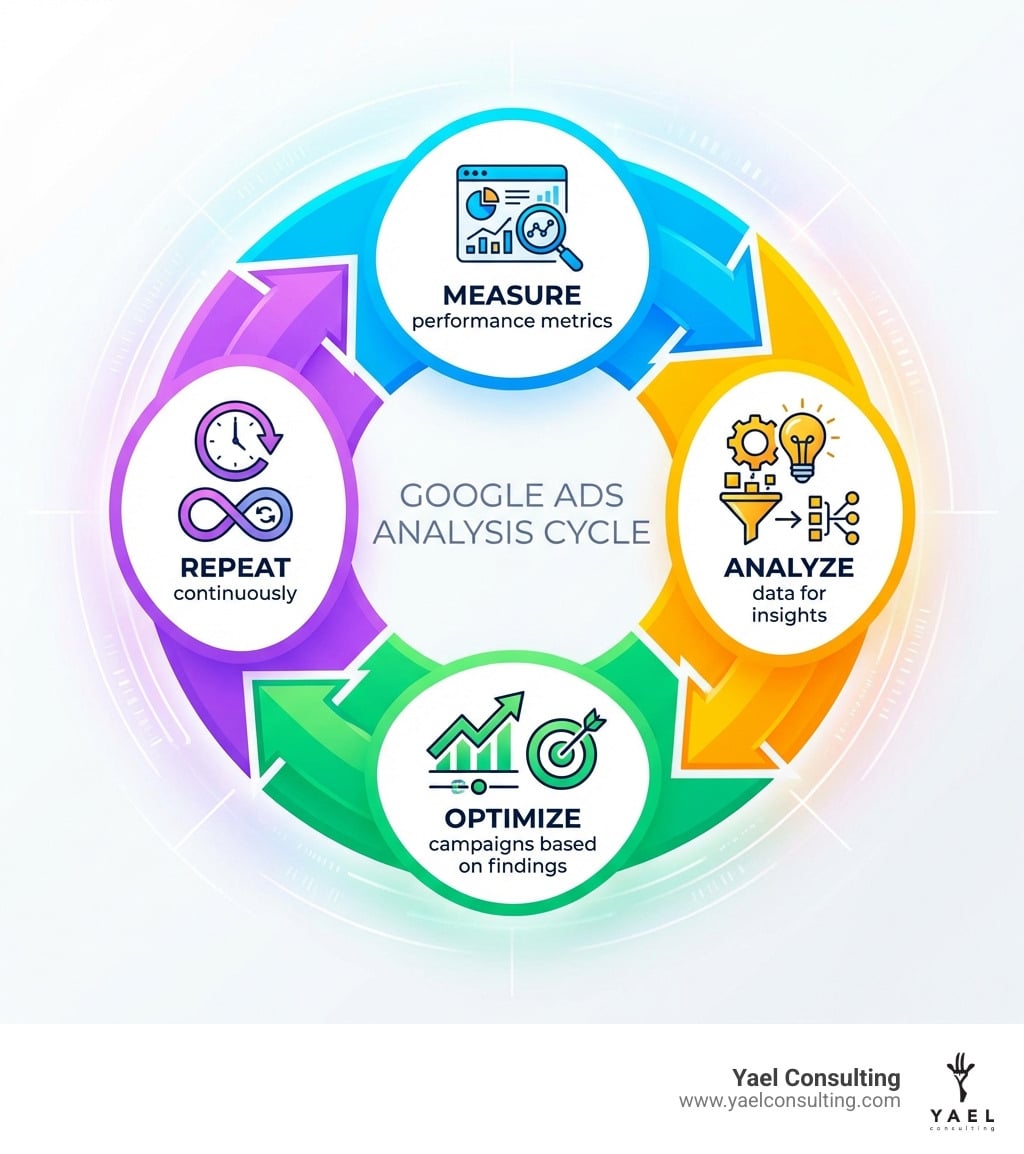
Effective Google Ads analysis isn’t just a task; it’s a continuous cycle of measurement, learning, and optimization. It’s about changing raw data into powerful strategies that drive real sales and profit growth for businesses, whether they’re e-commerce giants or lead generation specialists in New York, Los Angeles, or Israel.
By framing your analysis around clear business goals, consistently monitoring key performance indicators, carefully tracking conversions, and leveraging advanced reporting tools, you move beyond guesswork. You gain the clarity needed to eliminate wasted spend, improve ad quality, and strategically scale your campaigns.
We at Yael Consulting have spent over 15 years perfecting this process, helping businesses like yours turn their Google Ads into profit engines. We understand the nuances of the market and the importance of data-driven decisions. If you’re ready to open up the full potential of your Google Ads, we invite you to experience the difference our expertise can make.
Get a free, expert analysis of your Google Ads account, with guaranteed value, and start your journey towards maximizing your ROI today.