

Why Negative Keywords Are the Hidden ROI Lever in Your PPC Campaigns
Imagine your advertising budget is a bucket of water. Now, imagine that bucket has a dozen tiny, almost invisible holes. Each day, you lose a little water, but it’s not enough to cause immediate alarm. Over a month, however, you’ve lost half your water to a slow, steady drip. This is what happens to your PPC budget when you ignore negative keywords.
Negative keywords are the words and phrases you tell Google Ads not to show your ads for. They are the essential plugs for those leaks, ensuring your budget is spent only on the search queries that matter to your business. They are the gatekeepers of your campaigns, filtering out irrelevant traffic and protecting your return on investment (ROI).
If you are new to the concept, think of them as the opposite of the keywords you bid on. Your positive keywords tell Google, “show my ad when someone searches for this.” Your negative keywords tell Google, “never show my ad when someone includes this word or phrase in their search.” Used together, they give you far more control over your traffic quality and help you avoid paying for clicks from people who will never become customers.
Quick Answer: What You Need to Know About Negative Keywords
- What they are: Exclusionary terms that stop your ads from appearing on specific, irrelevant searches.
- Why they matter: They save money, increase click-through rates (CTR), boost conversion rates, and improve your overall Quality Score.
- How they work: They use three match types (broad, phrase, and exact) to control which searches to exclude with varying levels of precision.
- Where to find them: Your own Search Terms Report is the goldmine, supplemented by keyword research tools and competitive analysis.
- Implementation: You can add them at the account, campaign, or ad group level, depending on how broadly the exclusion should apply.
If you want a more technical definition, the official Google Ads documentation describes negative keywords as terms that “prevent your ad from being triggered by a certain word or phrase” (see the overview on Google Ads negative keywords for additional details). In practice, this means you can proactively shape which searches your budget is eligible to appear for.
It’s shocking, but a significant portion of advertisers—some studies suggest nearly half—don’t regularly add negative keywords to their accounts. This is like running a high-end steakhouse and leaving the door wide open for vegetarians to come in, browse the menu, and leave disappointed. You’re paying for every single one of those visits, and they will never convert.
When you neglect negative keywords, you’re essentially paying for window shoppers who have no intention of buying. An optometrist selling prescription glasses wastes money on clicks from users searching for “wine glasses.” A luxury watch brand burns its budget on queries like “cheap watch repair.” A B2B software company pays for clicks from job seekers typing “software engineer jobs.”
Every one of these irrelevant clicks is money down the drain. But the damage doesn’t stop there. These clicks also harm your campaign’s performance metrics. They lower your click-through rate (CTR), which in turn damages your Quality Score. A low Quality Score tells Google your ads are not relevant, and as a result, Google will charge you more per click (a higher CPC) to show them. It’s a vicious cycle of wasted spend and diminishing returns.
The good news? Negative keywords are the solution. They are one of the most powerful and often underused tools in your PPC arsenal. Advertisers who actively manage their negative keyword lists see higher CTRs, lower CPCs, better conversion rates, and a significantly improved ROI. It’s one of the fastest and most effective ways to stop bleeding money and start maximizing the profitability of your campaigns.
I’m Lior Krolewicz, and with over 15 years of experience managing Google Ads campaigns, I’ve seen how a strategic negative keyword strategy can transform struggling accounts into profit-generating machines. At Yael Consulting, we’ve even developed proprietary systems to identify and eliminate this wasteful spend in days, not weeks. This guide will walk you through the five simple steps to mastering negative keywords and taking control of your ad spend.
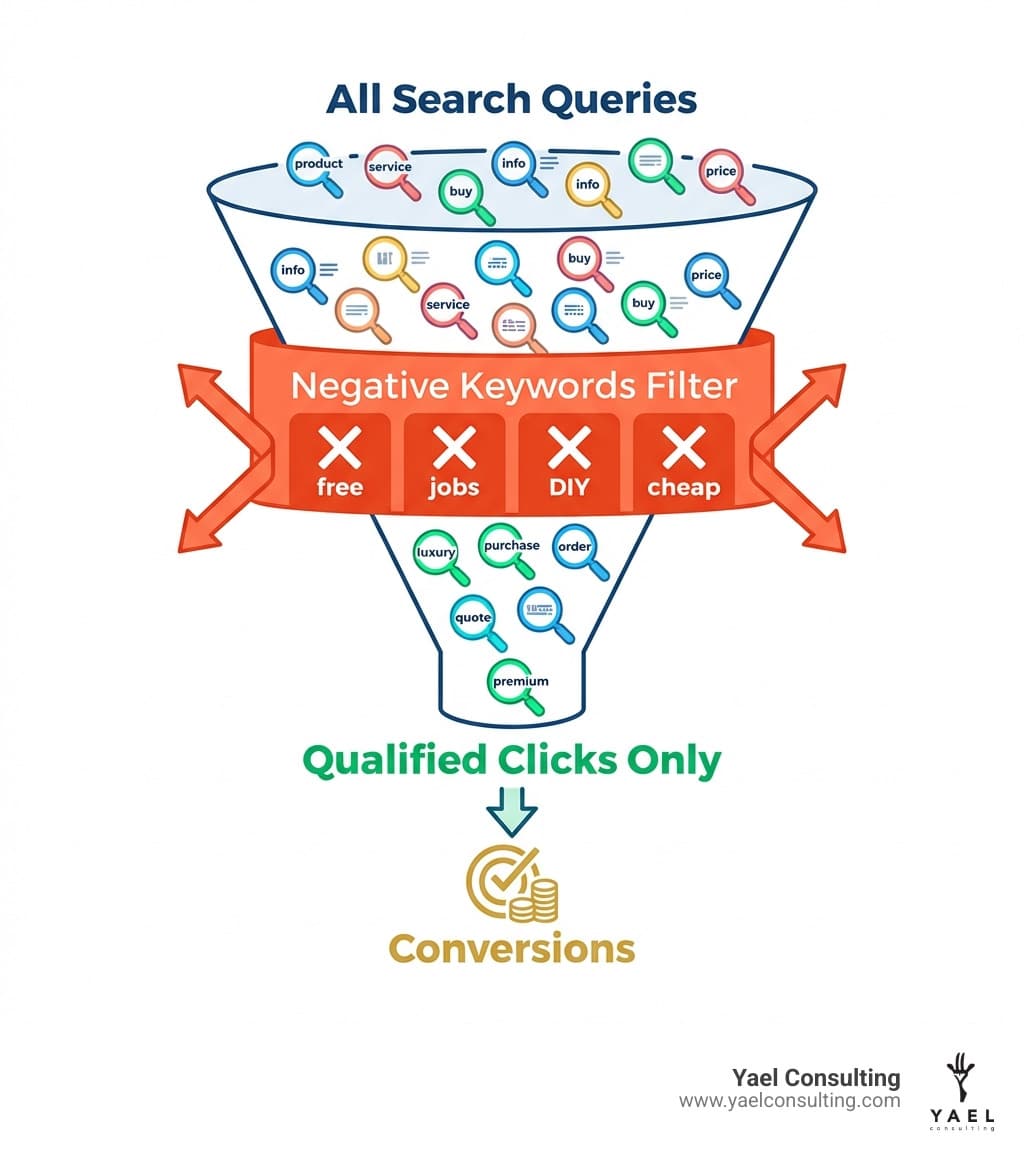
If you want to go even deeper after reading this guide, you can also review the broader context of keyword matching behavior in search advertising on resources like the Pay-per-click entry on Wikipedia. This article, however, will stay focused on the practical steps you can take today to use negative keywords to protect and grow your ROI.
Step 1: Master the 3 Negative Keyword Match Types
Before you can start wielding the power of negative keywords, you must understand the tools at your disposal. Unlike the keywords you bid on to trigger your ads, negative keywords do the opposite: they prevent your ads from showing. This distinction is fundamental. While your positive keywords cast a net to catch potential customers, negative keywords act as a filter, ensuring you only catch the right fish.
Google Ads offers three negative keyword match types, and each provides a different level of control. It’s crucial to note that these behave differently from their positive counterparts. Most importantly, negative keywords do not match to close variants like synonyms, plurals, or misspellings. If you want to block both “shoe” and “shoes,” you must add both as separate negative keywords.
This is where many advertisers get tripped up. They assume that because positive keywords now automatically match many close variants, negative keywords work the same way. They do not. If you only add the singular version of an irrelevant term, your ads may still show (and spend money) on plural or misspelled versions. Being thorough with variations is part of building a bulletproof negative keyword strategy.
Let’s break down each match type.
| Negative Match Type | Syntax | How it Works | Example | Your Ad Will NOT Show For | Your Ad MIGHT Still Show For |
|---|---|---|---|---|---|
| Broad Match | keyword |
Ad won’t show if the search contains all keyword terms, in any order. | running shoes |
blue running shoes, shoes for running, best running shoes | running sneakers, marathon shoes |
| Phrase Match | "keyword" |
Ad won’t show if the search contains the exact keyword phrase, in the same order. Other words can be before or after. | "running shoes" |
blue running shoes, best running shoes for men | running shoe, shoes for running |
| Exact Match | [keyword] |
Ad won’t show if the search is the exact keyword phrase, with no extra words. | [running shoes] |
running shoes | blue running shoes, running shoe |
In all three cases, negative keywords are evaluated at the search query level, not the keyword level. That means Google takes the actual words a user types into the search box and compares them to your negative list before deciding whether your ad is eligible to show.
Understanding Negative Broad Match
Syntax: keyword (e.g., free)
Negative broad match is the most restrictive of the negative types (and the least restrictive of the positive types, which can be confusing). Your ad will be blocked if the user’s search query contains all the words in your negative keyword, regardless of the order.
For example, if your negative broad keyword is running shoes, then both “best shoes for running” and “discount running shoes” will be blocked, as long as both words “running” and “shoes” appear somewhere in the query.
- When to use it: Use this when you want to exclude any search query that contains a specific term, no matter the context. For example, if you sell premium software, you might add
freeas a broad match negative. This would block searches like “free crm software,” “software for free,” and “how to get crm software for free.” - Avoid overuse: Because broad negatives can apply to many different contexts, they can sometimes block valuable long-tail searches unintentionally. A word like
review, for instance, might filter out both research-intent searches (less valuable) and high-intent brand reviews (which could be very valuable). Review your Search Terms Report before adding aggressive broad negatives. - Example: If you sell new cars, you would add
usedas a negative broad match keyword. This would prevent your ad from showing for searches like “used ford explorer” and “buy used cars near me.”
Understanding Negative Phrase Match
Syntax: "keyword phrase" (e.g., "for men")
Negative phrase match gives you more control than broad match. It excludes your ad only when the search query contains the exact phrase you specify, in the same order. Other words can appear before or after the phrase.
This makes negative phrase match ideal when word order really matters. If the intent of “cheap running shoes” is very different from “running cheap tests,” then adding "cheap running shoes" as a phrase negative will block only the undesired product-related searches, without interfering with unrelated terms.
- When to use it: This is perfect for excluding specific product models, types, or attributes you don’t offer. If you sell high-end leather shoes but not suede, you could add
"suede shoes"as a negative phrase. This would block “buy suede shoes” and “best suede shoes for winter” but would still allow your ad to show for “best leather shoes.” - Mind the word order: If you add
"blue running shoes"as a negative phrase, it will block “buy blue running shoes” and “blue running shoes sale,” but it will not block “running shoes blue” because the words do not appear in that exact order. - Example: A company selling women’s clothing might add
"for men"as a negative phrase match keyword. This would block searches like “dress shirts for men” and “summer clothes for men” but would still allow a search like “shirts for women and men” to potentially trigger an ad (since the exact phrase “for men” isn’t present in that order).
Understanding Negative Exact Match
Syntax: [keyword phrase] (e.g., [men's shoes])
Negative exact match is the most precise. It will only prevent your ad from showing if the search query matches your negative keyword exactly, with no other words.
This is a powerful way to trim out broad, unprofitable searches while still capturing longer, more qualified queries that include additional descriptors such as brand, size, or intent.
- When to use it: This is less common but useful for very specific situations. For example, if you sell a wide range of running shoes but find that the very generic query
[running shoes]has a low conversion rate, you might exclude it. This would block your ad for the searchrunning shoesbut would still allow it to show for more specific, long-tail queries likebest trail running shoes for womenornike running shoes size 10. - Great for pruning: Use exact negatives to surgically remove known money-wasting queries that you have verified in your Search Terms Report, without risking the loss of more qualified traffic that adds extra words around that core term.
- Example: If you are a plumber, you might find that the search query
plumberis too broad and attracts people looking for information or jobs. You could add[plumber]as a negative exact match. Your ad would still show for valuable searches likeemergency plumber near meorplumber for leaky faucet.
By understanding how these three match types work together, you can begin to design a negative keyword structure that aligns with your business goals: using broad to catch obviously irrelevant themes, phrase to remove specific unwanted combinations, and exact to trim out proven budget-draining queries while preserving high-intent traffic.