

Why You Need to Unmask Your Google Ads Rivals
How to do competitor analysis in Google Ads starts with understanding what your rivals are bidding on, what they’re saying in their ads, and how much they’re spending. Here’s the quick answer:
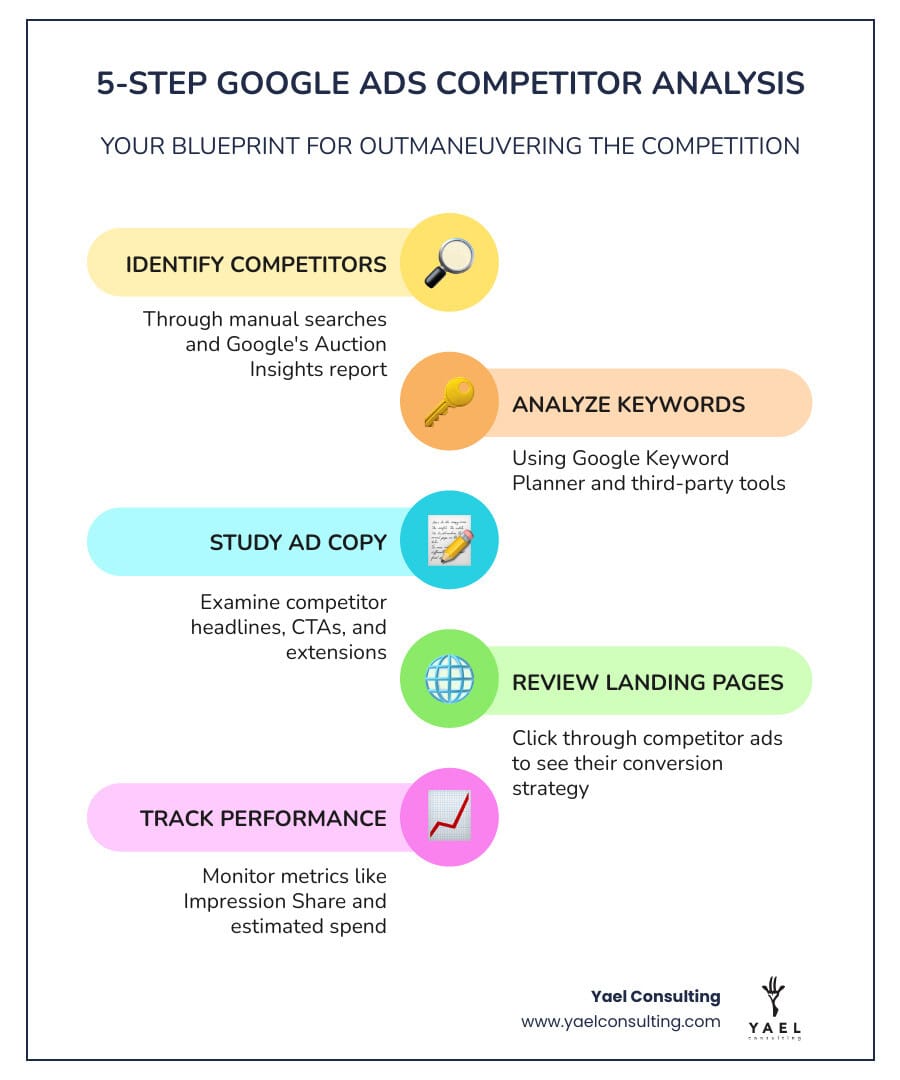
- Identify your competitors – Use manual searches and Google’s Auction Insights report.
- Analyze their keywords – Use Google Keyword Planner and third-party tools like SEMrush or Ahrefs.
- Study their ad copy – Search your target keywords and examine competitor headlines, CTAs, and extensions.
- Review their landing pages – Click through competitor ads to see their conversion strategy.
- Track their spend and performance – Use Auction Insights metrics like Impression Share and Overlap Rate.
- Monitor changes over time – Set up monthly reviews to spot shifts in competitor strategy.
If you’re running Google Ads, you’re in a constant fight for every click. Your competitors are bidding on the same keywords and targeting the same customers. The problem is, most advertisers are flying blind, guessing at bids and copying generic ad copy, which leads to wasted budget.
Competitor analysis changes that. It shows you what’s working in your market—which keywords drive conversions, what messaging resonates, and where rivals are wasting money. Advertisers who regularly conduct competitor analysis achieve 20-30% better performance metrics. This isn’t about copying; it’s about understanding where money flows, what converts, and how to position your brand to win.
Most Google Ads accounts waste 76% of their budget on non-converting search terms. Your competitors are likely making the same mistakes. By analyzing their campaigns, you can avoid those errors and capture the opportunities they’re missing. You can identify which keywords drive results, which ad copy pulls clicks, and which strategies fail.
This process uses publicly available information from tools like Google’s Auction Insights, the Ads Transparency Center, and third-party platforms like SEMrush. The goal is simple: outmaneuver your competition by learning from their wins and avoiding their losses.
I’m Lior Krolewicz, a former Special-Ops commander turned Google Ads expert. With over 15 years of experience, I’ve seen how competitor intelligence transforms struggling campaigns into profit machines by systematically turning insights into measurable results.
The ‘Why’ and ‘Who’: Defining Your Mission and Identifying Rivals
Understanding what is Google Ads competitor analysis and why is it important is the first step toward gaining a strategic advantage. It involves evaluating the ad campaigns of competing businesses to gain insights into their strategies, identify keyword opportunities, and understand their messaging. This research is essential for creating a successful paid search strategy and improving your own ad performance.
Identifying Your Top Google Ads Competitors
Before analyzing, you need to know who you’re analyzing. In Google Ads, your “auction competitors” are any advertisers bidding on the same keywords. This can include:
- Direct Competitors: Businesses offering similar products or services to the same market.
- Indirect Competitors: Companies offering different solutions to the same problem (e.g., a coffee bean supplier competing with a coffee machine seller).
- Search Competitors: Publishers, review sites, or large retailers that consistently appear for your target keywords.
- Local Competitors: Brands vying for attention within the same geographic area, such as New York or Los Angeles. Since 92% of searchers choose businesses on the first page of local results, this is vital for local PPC.
- Seasonal Competitors: Businesses that are only active during specific times, like holiday sales.
What are the best methods for manually checking competitor ads on Google Search? A simple, free way to identify competitors is to Google your target keywords.
- Use a Private Browsing Window: Open an incognito window to prevent your search history from skewing results, giving you an objective view.
- Search for Target Keywords: Enter your most important keywords and note the ads at the top and bottom of the search results page (SERP).
- Note Ad Position and Frequency: See which businesses consistently appear and how high they rank. This indicates their bidding aggressiveness.
- Examine Ad Copy and Extensions: Take screenshots of their headlines, descriptions, and ad extensions (sitelinks, callouts, etc.) to understand their messaging.
- Role-play as a Customer: Clicking on competitor ads (ethically) to explore their landing pages provides insights into their conversion funnels.
This manual process helps you build a list of your true Google Ads competitors and understand where to focus your deeper analysis.
Your Recon Toolkit: Free vs. Paid Competitor Analysis Methods
Once you’ve identified your rivals, equip yourself with the right tools to dissect their strategies. You have a range of options, from free resources to sophisticated paid platforms.

Using Google’s Free Arsenal for Reconnaissance
Google provides several powerful, free tools to kickstart your analysis.
How can Google Ads Keyword Planner be used for competitor analysis?
Enter a competitor’s website into the “Find new keywords” section to reveal keywords they are likely targeting. The tool also provides a “Competition level” (low, medium, high) and a “Suggested bid” range for keywords, helping you gauge costs and demand.
What insights can Google Shopping Merchant Center provide about competitors?
For e-commerce, you can infer competitor strategies by manually searching for their products. Observe their Shopping ads to see their pricing, special offers, customer ratings, and the quality of their product images and titles.
How does the Google Ads CPC simulator help in competitor analysis?
While not a direct competitor tool, the CPC simulator helps you model how bid changes affect your performance, which is crucial when responding to competitor actions.
What is the Google Ads Transparency Center, and how can it be used to view competitor ads?
The Ads Transparency Center is a free tool that lets you search for any company and see the ads it has run. You can view their ad creatives and filter by date, location (like New York or Los Angeles), and ad type to track their messaging shifts and campaign evolution.
What information can be gathered by role-playing as a potential customer clicking on competitor ads?
Clicking a competitor’s ad takes you to their landing page. Analyze it to evaluate the message match with the ad, the clarity of their call-to-action (CTA), the overall user experience, and the steps in their conversion funnel.
How to do competitor analysis in Google Ads using third-party tools
While Google’s free tools are a great start, paid third-party tools offer a much deeper dive into competitor strategies. These are crucial for a comprehensive how to do competitor analysis in Google Ads strategy.
What are the key features of third-party tools like Ahrefs and SEMrush for Google Ads competitor analysis?
Tools like Ahrefs and SEMrush provide robust features for competitive PPC intelligence.
Key Features to Look For in a Third-Party Tool:
- Keyword Analysis: Identify keywords competitors are bidding on, along with estimated search volume and Cost-Per-Click (CPC).
- Keyword Gap Analysis: Find valuable keywords your competitors rank for that you don’t.
- Ad Copy Analysis: View historical and current ad creatives to understand their messaging and offers.
- Landing Page Insights: See the landing pages associated with competitor ads to analyze their conversion funnels.
- Ad Spend Estimation: Get directional intelligence on how aggressively competitors are spending.
- PLA Research (for Shopping Ads): Get an inside look at competitors’ Google Shopping campaigns, including products, pricing, and triggering keywords.
How can I analyze competitor keywords, ad copy, and performance using Ahrefs and SEMrush?
- Ahrefs: Use Site Explorer to see a competitor’s paid search traffic, top paid keywords, and ad history. This also reveals their overall online presence, which can influence their Google Ads Quality Score.
- SEMrush: Its Advertising Research toolkit is a PPC powerhouse. Enter a competitor’s domain to see their top paid keywords, ad copy, estimated spend, and keyword gaps compared to your own domain.
| Feature | Free Tools (Google) | Paid Tools (Third-Party, e.g., SEMrush, Ahrefs) |
|---|---|---|
| Cost | Free | Subscription-based |
| Keyword Data | Volume, competition, suggested bids (general) | Competitor-specific keyword lists, traffic estimates, CPC, keyword gap analysis |
| Ad Copy | Ads Transparency Center: View current/past ads | Historical ad creatives, A/B test insights, ad position, messaging analysis |
| Landing Pages | Manual clicks and review | Direct links to landing pages from ads, funnel structure analysis |
| Spend/Budget | Auction Insights (impression share for your keywords) | Estimated monthly ad spend, budget allocation trends |
| Performance | Auction Insights: Impression Share, Overlap Rate | Impression share trends, estimated traffic share, competitive benchmarking |
| Campaign History | Ads Transparency Center: Limited ad history | Extensive historical data for keywords, ads, and spend |
| Ease of Use | Requires manual effort and interpretation | Automated data collection, comprehensive dashboards |
| Depth of Insight | Good for basic understanding | Deep, actionable insights into competitor strategy and opportunities |
| Bias | Google-centric data | Modeled data; directionally intelligent but not exact |
Decoding the Battlefield: Mastering Google’s Auction Insights Report
One of Google’s most powerful tools for competitor analysis is the Auction Insights report. It lets us compare our performance with other advertisers participating in the same auctions. This helps you make strategic decisions about bidding and budgeting by showing where you’re succeeding and where you’re missing opportunities.
Understanding Key Auction Insights Metrics
The report provides several key statistics to give you a competitive edge:
- Impression Share (IS): The percentage of impressions you received out of the total you were eligible for. A low IS can indicate issues with budget, bids, or Quality Score.
- Overlap Rate: How often a competitor’s ad received an impression when your ad also did. This shows how frequently you directly compete.
- Outranking Share: How often your ad ranked higher than a competitor’s, or showed when theirs didn’t. This is a direct measure of your competitive strength.
- Position Above Rate (Search campaigns only): How often a competitor’s ad was shown in a higher position than yours when both ads appeared.
- Top of Page Rate: How often your ad (or a competitor’s) was shown above the organic search results.
- Absolute Top of the Page Rate: How often your ad (or a competitor’s) was the very first ad shown on the page.
Best Practices for Filtering and Segmenting Auction Insights
To make this data actionable, you need to know how to find and interpret the Auction Insights report in Google Ads and what are the best practices for filtering Auction Insights data.
-
Finding the Report: You can access the report by selecting a specific Campaign, Ad group, or Search keyword and then clicking “Auction insights.”
-
Filtering Your Data:
- By Time Period: Analyze trends over different periods (weekly, monthly) to spot seasonal changes or new competitor efforts.
- By Device: Segment by mobile, desktop, and tablet. A competitor might be dominating mobile but neglecting desktop, which is a critical insight for targeting users in cities like New York or Los Angeles.
- By Campaign, Ad Group, or Keyword: Dive into specific campaigns or high-value keywords to understand competition at a granular level.
By regularly reviewing this report, you can make informed decisions. For instance, if a competitor’s impression share is rising while yours is falling, it’s a clear signal to investigate their strategy and adjust your own.
The Complete Guide on How to Do Competitor Analysis in Google Ads
How to do competitor analysis in Google Ads is a multi-faceted process that involves building a comprehensive picture of our rivals’ entire paid search ecosystem, from their keywords to their conversion funnels.
Analyzing Competitor Keywords and Bidding Strategy
Understanding a competitor’s keyword strategy helps you find opportunities and avoid costly bidding wars. Use third-party tools to perform a Keyword Gap analysis, which reveals valuable terms they are targeting that you are missing. Look for both high-volume keywords and less competitive, highly specific long-tail keywords, which often have higher purchase intent. Tools can also provide estimated monthly ad spend and CPCs, giving you an idea of advertising costs in our industry and helping you prioritize your budget effectively.
Deconstructing Competitor Ad Copy and Landing Pages
The ad and landing page are where conversions happen. Analyze competitor headlines and descriptions to see what benefits they highlight, the emotions they tap into, and which calls to action (CTAs) they use. Identify their Unique Selling Propositions (USPs)—are they emphasizing price, quality, or a unique feature? Also, review their use of ad extensions like sitelinks and callouts, which can significantly boost visibility.
After clicking an ad, review the landing page for its design, user experience, and clarity. A strong message match between the ad and the landing page indicates a well-optimized funnel. Analyze their conversion funnel to see how easy it is for a user to convert and identify areas where our own process can be superior.
How to do competitor analysis in Google Ads for different campaign types
The approach varies slightly by campaign type:
- Google Search Ads: This is the most common form of competitor analysis, focusing on keywords, text-based ad copy, extensions, and landing pages.
- Google Shopping Ads (PLAs): For e-commerce, analysis shifts to product attributes like titles, images, pricing, promotions, and reviews seen directly in the Shopping results. You’re comparing product offers, not just ad messaging.
- Display Ads: For display ads, we focus on competitor creatives (banners, images), their messaging, and inferred targeting (e.g., remarketing, audience interests).
- Video Ads (YouTube): Competitor analysis for video ads involves studying their video content, calls-to-action, and how they use YouTube for branding or direct response. The Ads Transparency Center is useful for viewing both Display and Video ads.
Best Practices: Staying Ethical and Consistent
While how to do competitor analysis in Google Ads is a powerful strategy, it’s crucial to approach it ethically and consistently.
Ethical Considerations When Conducting Google Ads Competitor Analysis
- Use Publicly Available Information: Rely on data from search results, the Google Ads Transparency Center, and third-party tools.
- Respect Trademarks: Be mindful of Google’s policies on using competitor brand names in your ad copy.
- Improve, Not Copy: The goal is to learn and differentiate your own strategy, not to plagiarize a competitor’s.
How Often Should I Perform Google Ads Competitor Analysis to Stay Competitive?
Competitor analysis is an ongoing process, not a one-time task.
- Monthly Reviews: Perform a PPC competitive analysis monthly to spot new competitor moves and adapt your strategy quickly.
- Quarterly Strategy Shifts: Conduct a deeper analysis quarterly to identify long-term trends and inform major campaign adjustments.
- Tracking Changes Over Time: Maintain a tracker to document competitor keywords, ad copy, and performance metrics. This helps identify patterns and the evolution of their strategies.
Consistent monitoring helps you identify keyword gaps, understand what drives engagement, and protect your own branded keywords from competitors.
Frequently Asked Questions about Google Ads Competitor Analysis
How often should I perform a Google Ads competitor analysis?
We recommend a monthly analysis to keep up with the dynamic paid search landscape. Competitors constantly adjust bids and launch new ads, so regular reviews are key to adapting your strategy. A deeper quarterly review is also beneficial for long-term planning.
What are the biggest mistakes to avoid when analyzing competitors?
- Directly Copying: Never copy a competitor’s strategy outright. What works for them may not work for your brand or audience.
- Ignoring Your Own Data: Use competitor analysis to supplement, not replace, insights from your own campaign performance.
- Focusing Only on Keywords: A complete analysis includes ad copy, landing pages, and conversion funnels, not just keywords.
- One-Time Analysis: The market is always changing, so analysis must be an ongoing process.
- Trusting Spend Estimates Blindly: Third-party tool spend figures are estimates. Use them for directional intelligence, not as exact numbers.
- Neglecting Local Competitors: For businesses in cities like New York or Los Angeles, ignoring local rivals is a costly mistake.
Can I see my competitors’ exact bids or budgets?
No, Google Ads does not make exact bids or budgets public. Third-party tools provide estimations based on performance data. These are useful for gauging competitive intensity but are not 100% accurate. Use them directionally to inform your own strategy.
Conclusion: Turn Your Intel into Action and Outmaneuver the Competition
Understanding how to do competitor analysis in Google Ads is a strategic imperative. Systematically analyzing your rivals transforms campaigns from guesswork into a precise, profit-driven machine.
By identifying competitors, using free and paid tools, and deconstructing their ads and landing pages, you can gain invaluable insights. The goal is to apply this intelligence to optimize your ad copy, refine your keyword strategy, and make smarter bidding decisions. This process helps you learn what works in your market, avoid costly mistakes, and ultimately drive more relevant traffic and conversions.
At Yael Consulting, we specialize in turning these competitive insights into significant sales and profit growth for our clients. With 15+ years of expertise, proprietary technology, and direct CEO involvement, we translate analysis into high-impact strategies.
Ready to stop guessing and start winning? Let us help you unmask your rivals and build a strategy that dominates your market.
Get a free, actionable Google Ads analysis today and find out how our expertise can give you the competitive edge.