
Why Account-Level Negative Keywords Are Critical for Ad Spend Efficiency
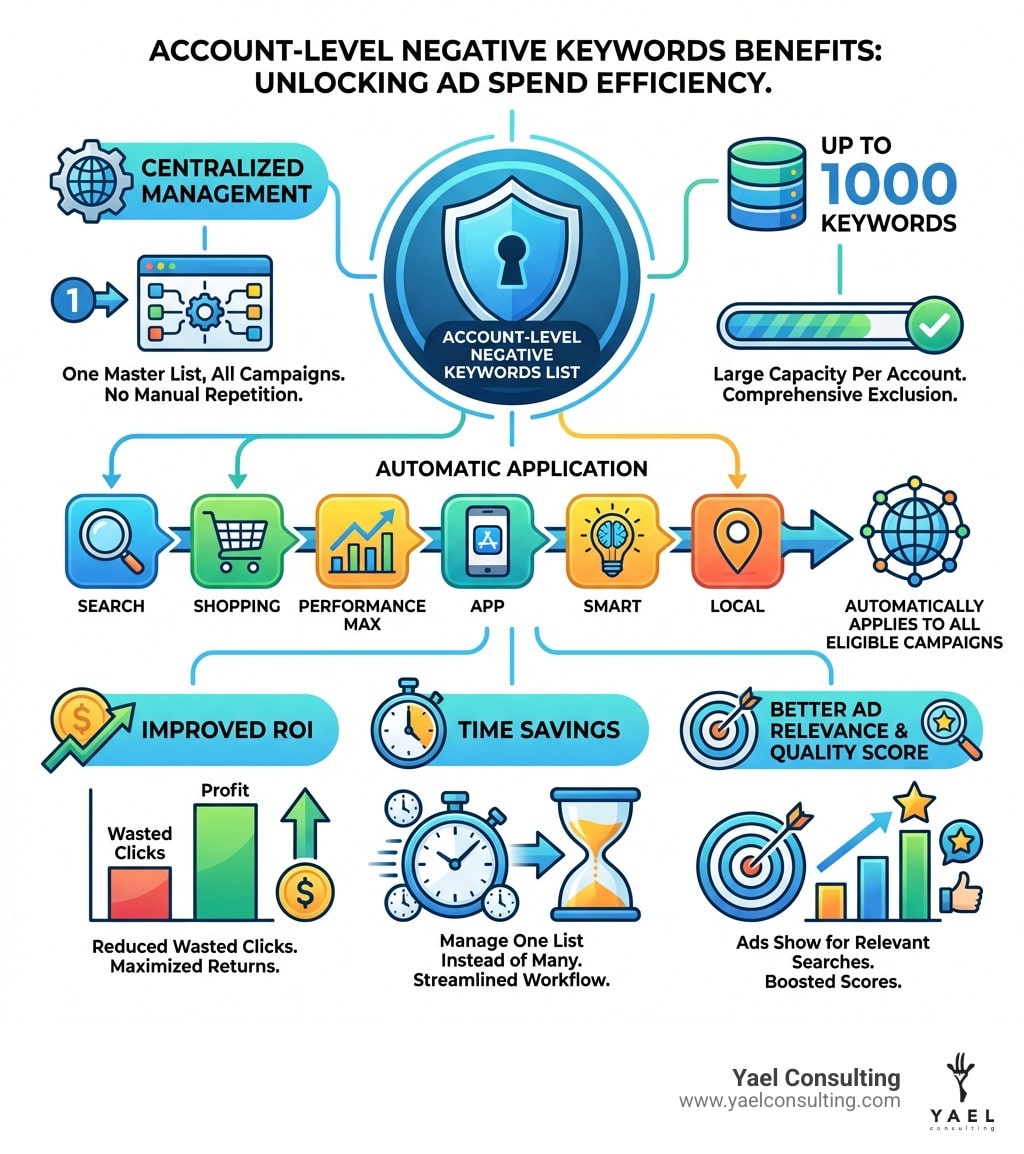
Account level negative keywords google ads are a powerful tool that lets you exclude irrelevant search terms from all your campaigns at once. Instead of manually adding the same negative keywords to each campaign individually, you create a single master list that automatically applies across your Search, Shopping, Performance Max, App, Smart, and Local campaigns.
Quick Answer:
- What they are: A single, centralized list of up to 1,000 negative keywords that automatically exclude irrelevant search terms from all search and shopping inventory across your Google Ads account
- Why they matter: Save time, reduce wasted ad spend, improve click-through rates, and ensure ads only show for relevant searches
- Where they apply: Search, Shopping, Performance Max, App, Smart, and Local campaigns
- How to access them: Steer to Admin > Account settings > Negative keywords in your Google Ads interface
If you’ve been in PPC advertising for any length of time, you know the pain of wasted clicks. You’re paying for searches like “free,” “jobs,” or “DIY” when your business offers premium paid services. You might be a sporting goods store selling workout clothes, but your ads keep showing for “dress pants” and “blouses.”
This is where account level negative keywords google ads become essential. They act as a universal filter that blocks irrelevant traffic before it drains your budget. Instead of playing whack-a-mole across dozens of campaigns, you set your exclusions once and they apply everywhere.
The benefits are immediate and measurable. Advertisers typically see higher click-through rates, lower cost-per-click, and better conversion rates when they implement a solid account-level negative keyword strategy. You’re not just saving money—you’re improving ad relevance and Quality Score across your entire account.
I’m Lior Krolewicz, and over my 15 years managing Google Ads campaigns, I’ve helped businesses save hundreds of thousands in wasted ad spend by implementing strategic account level negative keywords google ads lists. My proprietary IBEX system now automates much of this optimization, but the fundamentals remain critical for every advertiser.
What Are Account-Level Negative Keywords and Why Are They Essential?
At its core, an account level negative keywords google ads list is a powerful, centralized exclusion list. It allows us to tell Google Ads, “Hey, don’t show our ads for these specific search terms, no matter which campaign they might otherwise trigger.” This feature enables advertisers to exclude search terms from campaigns serving on search and shopping inventory, helping us focus on what truly matters to our customers and our business goals.
Think of it as a universal guardrail for your entire Google Ads account. Instead of painstakingly adding the same irrelevant terms to every single campaign, ad group, or even shared list, we create one master list. This single list automatically applies across all relevant search and shopping inventory in all eligible campaigns within our account.
This centralized management offers immense time efficiency. Imagine having dozens or even hundreds of campaigns. Manually updating negative keywords across all of them is not just tedious; it’s a monumental waste of time. With account level negative keywords google ads, we make an edit once, and it propagates everywhere, saving countless hours that can be redirected to more strategic initiatives.
The benefits extend far beyond just saving time. By preventing our ads from showing for irrelevant searches, we significantly improve our Return on Investment (ROI). We stop paying for clicks that will never convert, ensuring our ad spend is directed towards high-intent users. This also contributes to brand safety, as we can proactively exclude terms that might be associated with inappropriate content or search intent that doesn’t align with our brand values. It sharpens our ad relevance, ensuring that when our ads do appear, they are seen by the most receptive audience.
To better understand the distinct role of account level negative keywords google ads, let’s compare them to other negative keyword applications:
| Feature | Account-Level Negative Keywords | Campaign-Level Negative Keywords | Ad Group-Level Negative Keywords |
|---|---|---|---|
| Scope of Application | All eligible campaigns in the account | Specific campaigns | Specific ad groups within a campaign |
| Primary Purpose | Universal exclusions for irrelevant terms across the entire business | Campaign-specific exclusions for broader themes or products | Fine-tuning exclusions for highly specific ad groups |
| Management Effort | Low (one list for the account) | Medium (one list per campaign or shared list for multiple) | High (individual exclusions for each ad group) |
| Keyword Limit | 1,000 keywords per account | 5,000 keywords per list (up to 20 lists per account) | 20,000 keywords per ad group |
| Impact on Campaigns | Applies to Search, Shopping, PMax, App, Smart, Local campaigns | Applies to the specific campaigns it’s assigned to | Applies only to the specific ad group it’s assigned to |
| Override Hierarchy | Overridden by campaign/ad group level positive keywords (NO – Negatives always override) | Overridden by ad group level positive keywords (NO – Negatives always override) | Overrides all other settings (NO – Negatives always override) |
Correction: It’s crucial to note that negative keywords, at any level (account, campaign, or ad group), will always prevent an ad from showing for a matching search query, even if we are actively bidding on it as a positive keyword. They act as an absolute block.
The Core Benefits of a Centralized Exclusion List
Implementing a centralized exclusion list through account level negative keywords google ads brings a cascade of benefits that directly impact our campaign performance and overall efficiency:
- Increased Click-Through Rate (CTR): By filtering out irrelevant search queries, our ads are only shown to users whose searches closely match what we offer. This means a higher percentage of people who see our ad will be genuinely interested and click on it, leading to a higher CTR.
- Reduced Cost-Per-Click (CPC): Google Ads rewards relevance. When our ads are more relevant (thanks to fewer irrelevant impressions and clicks), our Quality Score improves. A higher Quality Score often translates to lower CPCs, meaning we pay less for each valuable click.
- Higher Conversion Rates: Less wasted traffic means more qualified leads or potential customers reaching our landing pages. These users are more likely to convert, leading to a healthier conversion rate and more valuable outcomes for our business. We are not just saving money; we are making our budget work smarter.
- Simplified Campaign Management: This is perhaps one of the most immediate and tangible benefits. Instead of juggling multiple negative keyword lists across various campaigns, we have one central hub. This dramatically streamlines the process of adding, editing, or removing terms, freeing up valuable time for strategic analysis and optimization.
- Consistent Ad Filtering: A centralized list ensures that our entire account adheres to the same set of universal exclusions. This prevents inconsistencies where an irrelevant term might be blocked in one campaign but allowed in another, leading to a more robust and predictable ad filtering strategy across our entire Google Ads presence.
Understanding the Limits and Scope
While powerful, account level negative keywords google ads do come with certain limitations and specific scopes of application that we need to be aware of.
The most significant limitation is the 1,000 keyword limit. We can include up to 1,000 individual negative keywords in our account-level list. This might seem like a lot, but for some businesses, especially those with very broad offerings or complex negative keyword needs, this limit can be reached. For more extensive exclusion requirements, we would typically rely on campaign-level negative keyword lists, which can accommodate up to 5,000 negative keywords per list and allow for up to 20 such lists per account.
In terms of scope, account level negative keywords google ads primarily apply to Search and Shopping inventory. This means they will prevent our ads from showing on Google Search results pages and Google Shopping ads for the specified terms. This automatic application extends to all eligible campaign types within our account that use this inventory. You can find more detailed information directly from Google on their About account-level negative keywords help page.
The key takeaway here is the automatic application. Once we add a term to our account-level negative keyword list, it instantly acts as a blanket exclusion across all relevant campaigns, providing a consistent layer of protection against irrelevant searches.
A Step-by-Step Guide to Managing Account-Level Negatives
Managing your account level negative keywords google ads is straightforward once you know where to look. This section provides a walkthrough of the Google Ads user interface for managing your account-wide exclusions, ensuring your campaigns are always protected from irrelevant searches.

How to Add, Edit, and Remove Keywords in Your Account Settings
Here’s how we can steer the Google Ads interface to manage our account-level negative keywords:
- Steer to Admin: In your Google Ads account, click the Admin icon (it looks like a wrench or a gear) in the top right corner.
- Access Account Settings: From the dropdown menu, click on Account settings.
- Expand “Negative keywords” section: Scroll down the Account Settings page until you see the “Negative keywords” section. Click to expand it.
- Add Keywords:
- Click the blue plus button (+).
- Enter your negative keywords, with one word or phrase per line.
- Click Save.
- Edit Match Types:
- To change the match type for an existing negative keyword, hover over the keyword.
- Click the pencil icon that appears.
- Use the dropdown menu to select the desired match type (broad, phrase, or exact).
- Click Save.
- Remove Keywords:
- Check the box next to the negative keywords you wish to remove.
- Click the Remove button at the top of the table.
We can also filter our list of negative keywords by clicking “Add filter” and searching by keyword text or match type, which is super handy for larger lists.
How Negative Keyword Match Types Work
Understanding negative keyword match types is critical because they dictate how strictly Google Ads will prevent your ads from showing. They work a little differently than positive keyword match types, so pay close attention!
- Negative Broad Match: This is the most expansive exclusion. If your negative keyword is “flowers” (broad match), your ads won’t show for searches that include all the words in your negative keyword, even if they’re in a different order, and they can include other words. For example, if we exclude “flowers” as a negative broad match, ads won’t be eligible to serve when a user searches “red flowers,” but they can serve if a user searches for “red flower.” It aims to cover a wide range of irrelevant variations.
- Negative Phrase Match: This match type excludes searches that contain the exact phrase of your negative keyword, but can include other words before or after it. For instance, if our negative keyword is “delivery service” (phrase match), our ads won’t show for “fast delivery service” or “delivery service near me,” but they might still show for “delivery jobs” because the phrase “delivery service” isn’t present.
- Negative Exact Match: This is the most restrictive exclusion. Your ads will only be prevented from showing if the search query is an exact match to your negative keyword, with no extra words before or after. So, if your negative keyword is “[cheap shoes]” (exact match), your ads will only be blocked for the search “cheap shoes.” Searches like “cheap running shoes” would still be eligible.
No Close Variants: A crucial distinction for negative keywords is that they do not match to close variants or other expansions in the same way as positive keywords. This means if you want to exclude singular and plural forms, common misspellings, or other close variations, you often need to add them all individually to your negative keyword list.

For a deeper dive into how these match types operate, we recommend consulting the official About negative keywords – Google Ads Help documentation.
Campaign Compatibility and Advanced Applications for account level negative keywords google ads
The true power of account level negative keywords google ads lies in their broad applicability across various campaign types, simplifying management and ensuring consistent ad filtering. But there are also some specific nuances and advanced ways to leverage these exclusions.
Which Campaign Types Are Affected?
When we implement account level negative keywords google ads, they automatically apply to all search and shopping inventory in the following campaign types within our account:
- Search campaigns: Our bread and butter, where ads appear on Google search results.
- Shopping campaigns: Product listing ads that show up for relevant shopping queries.
- Performance Max: Google’s automated campaign type that serves across all Google channels.
- App campaigns: Designed to drive app installs and in-app actions.
- Smart campaigns: Simplified, automated campaigns for small businesses.
- Local campaigns: Aimed at driving store visits and local actions.
This comprehensive coverage ensures that a single, well-maintained account-level list provides a robust layer of protection across the majority of our advertising efforts.
Using account level negative keywords google ads with Performance Max
Performance Max (PMax) campaigns are designed to automate and optimize ad delivery across all Google channels. While they are highly automated, account level negative keywords google ads play a vital role in guiding their targeting and preventing wasted spend.
When we add negative keywords at the account level, they automatically apply to our PMax campaigns, but with a specific scope:
- Search inventory only: Account-level negative keywords will prevent our PMax ads from showing for search queries containing those terms on Google Search results pages.
- Shopping inventory only: Similarly, they will block our PMax product listings from appearing for irrelevant queries in Google Shopping.
While account-level negatives provide crucial guidance for PMax’s search and shopping components, they do not directly control PMax’s targeting on other networks like Display or YouTube in the same way. For specific exclusions on those networks, we might need to look at other content exclusion settings. Google provides more details on Negative keywords in Performance Max campaigns.
What Are Excluded Content Keywords?
While account level negative keywords google ads are fantastic for refining our search and shopping presence, there’s another type of exclusion we should be aware of, particularly for brand suitability on content networks: excluded content keywords.
These are different from our search negatives. Excluded content keywords are terms we use to prevent ads from appearing alongside non-relevant content, such as videos, channels, websites, and apps that contain specific words in their titles and descriptions. They apply specifically to campaigns running on:
- Display Network: This includes millions of websites, news pages, and blogs.
- YouTube Network: This covers videos and channels on YouTube.
The primary goal of using excluded content keywords is brand suitability. They help us opt out of showing ads alongside content that may not be appropriate for our brand or serve our advertising goals. For example, if we’re a children’s toy company, we might exclude content keywords related to violence or adult themes to protect our brand image.
We can find and manage these content exclusions by navigating to Admin > Account settings > View suitability settings > Exclude content keywords in our Google Ads account. Up to 1,000 content keywords can be excluded at this level.
Managing Keywords via the Google Ads API
For advanced users, agencies like ours, and businesses with very large or complex Google Ads accounts, manually managing negative keywords through the interface can still be time-consuming. This is where the Google Ads API comes into play, offering programmatic management of account level negative keywords google ads.
The Google Ads API allows us to automate the creation, retrieval, and updating of our negative keyword lists. This means we can integrate negative keyword management into our existing systems or use custom scripts to maintain highly optimized exclusion lists.
The process typically involves:
- Creating or retrieving Shared Sets: Specifically, shared sets of type
ACCOUNT_LEVEL_NEGATIVE_KEYWORDS. These are essentially containers for our negative keywords. We can use a GAQL query likeSELECT shared_set.id, shared_set.status, shared_set.type, shared_set.resource_name, shared_set.name FROM shared_set WHERE shared_set.type IN ('ACCOUNT_LEVEL_NEGATIVE_KEYWORDS')to retrieve existing lists. - Creating SharedCriterions: These are the individual negative keywords themselves, which are then attached to the
shared_set. - Preparing NegativeKeywordListInfo: This links the
shared_setto the account as aCustomerNegativeCriterion. - Running CustomerNegativeCriterionOperation: This operation allows us to create, update, or remove the negative keyword list associated with our account.
Only one negative keyword list criterion can be attached per account at this level. When working with the API, detailed documentation on concepts like request and response logging, along with request IDs and headers, is crucial for troubleshooting any issues. Our team at Yael Consulting leverages the API extensively to ensure our clients’ accounts are always running at peak efficiency.
Best Practices for Building Your Exclusion List
Building an effective account level negative keywords google ads list isn’t a one-time task; it’s an ongoing, proactive strategy. A well-curated list can save us significant ad spend and improve campaign performance.
Our best practices involve a combination of proactive brainstorming and continuous, data-driven optimization:
- Proactive Strategy: Before even launching campaigns, we brainstorm a list of terms that are definitely irrelevant to our business. What are people searching for that might sound similar to our offerings but is actually completely unrelated? What are common “free” or “DIY” terms in our industry?
- Ongoing Optimization: The search landscape is constantly evolving, and so should our negative keyword lists. We regularly review our campaign data to identify new opportunities for exclusion.
- Search Terms Report (STR): This is our goldmine for negative keyword ideas. The Search Terms Report shows us the actual queries people typed into Google that triggered our ads. By analyzing this report, we can spot irrelevant searches that are wasting our budget and promptly add them to our negative keyword list. We look for terms with high impressions but low or no conversions, or terms that are clearly off-topic.
- Brainstorming Irrelevant Terms: Beyond the STR, we encourage thinking broadly about what our target audience isn’t looking for. If we sell luxury items, we’d want to exclude “cheap” or “discount.” If we offer a service, we’d exclude “jobs” or “careers.”
[LIST] of Universal Negative Keywords to Add Immediately
To get you started, here’s a list of common account level negative keywords google ads that we often recommend adding to nearly any account. These are terms that, for most businesses, indicate a lack of buying intent or a search for something you likely don’t offer:
- jobs
- free
- cheap
- discount
- diy
- how to
- what is
- forum
- reviews
- torrent
- download
- guide
- images
- pictures
- template
- example
- wiki
- competitor brand names (e.g., if you sell coffee, exclude “Starbucks,” “Dunkin’ Donuts,” etc., unless you specifically want to target competitor searches)
Remember to consider these with their appropriate match types. For instance, [free] as exact match might be too restrictive, whereas free as broad match covers more ground.
Frequently Asked Questions about account level negative keywords google ads
We often encounter common questions about account level negative keywords google ads. Here are some of the most frequent ones:
What is the difference between account-level negative keywords and a shared negative keyword list?
This is a great question, as the terminology can be a bit confusing!
- Account-level negative keywords: This is a single, global list that we create directly in our account settings. It automatically applies to all eligible Search, Shopping, Performance Max, App, Smart, and Local campaigns within that specific Google Ads account. It’s like a universal filter for our entire advertising presence. The key limit here is 1,000 keywords per account.
- Shared negative keyword list: This is a list we create in the “Shared Library” section of Google Ads. Unlike the account-level list, a shared list does not automatically apply to all campaigns. Instead, we manually select which campaigns we want to apply it to. This gives us more flexibility. We can create multiple shared lists (up to 20 per account), and each list can contain up to 5,000 negative keywords.
So, while both are ways to centralize negative keyword management, the account level negative keywords google ads list is a single, automatic, account-wide exclusion, whereas shared lists are campaign-specific and require manual application. For more details, Google’s About negative keyword lists explains this further.
Can I use more than 1,000 account level negative keywords google ads?
Unfortunately, no. The dedicated account level negative keywords google ads list is capped at 1,000 keywords per account. This limit is set by Google to balance global exclusions with system performance.
If we find ourselves needing to exclude more than 1,000 terms across our account, our strategy would be to use campaign-level shared negative keyword lists. As mentioned above, we can create up to 20 such lists, each containing up to 5,000 keywords. We would then apply these shared lists to all relevant campaigns. This effectively allows us to have a much larger pool of negative keywords, organized and applied strategically.
Do account-level negatives override campaign-level positive keywords?
Yes, absolutely! This is a critical rule to understand in Google Ads. Negative keywords at any level (account, campaign, or ad group) will always prevent an ad from showing for a matching search query, even if we are actively bidding on that exact term as a positive keyword in one of our campaigns.
Think of negative keywords as the ultimate veto power. If a search query matches a negative keyword, the ad will not show, period. This protective layer ensures that our budget is never wasted on terms we’ve explicitly deemed irrelevant, regardless of our positive keyword strategy.
Conclusion: Streamline Your Campaigns and Maximize ROI
In the world of Google Ads, efficiency and precision are paramount. Account level negative keywords google ads are not just a feature; they are a fundamental best practice that empowers us to take control of our ad spend and maximize our return on investment.
By implementing a robust account-level negative keyword strategy, we can:
- Reduce wasted ad spend: Stop paying for irrelevant clicks that drain our budget.
- Improve ad relevance: Ensure our ads are seen by the right audience, leading to higher engagement.
- Boost CTR and Conversion Rates: More relevant traffic means better performance across the board.
- Simplify campaign management: Save valuable time by managing exclusions from a single, centralized list.
- Protect brand suitability: Prevent our ads from appearing alongside undesirable content.
At Yael Consulting, with our 15 years of expertise in Google Ads, we’ve seen the transformative impact of carefully managed negative keyword lists. Our proprietary IBEX system, developed through years of experience, integrates these principles to deliver significant sales and profit growth for our e-commerce and lead generation clients.
Don’t let irrelevant searches eat into your profits. Take control of your ad spend today. We invite you to experience the difference.
Get a free, in-depth analysis of your Google Ads negative keywords. Let us show you how we can optimize your account for maximum efficiency and growth.