

Why Google Ads Analysis Tools Are Your Secret Weapon Against Wasted Ad Spend
Google ads analysis tools help you understand where your ad dollars are going and if they’re making you money. The best part? Google offers a powerful suite of free built-in tools that most advertisers barely touch.
Quick Answer: The Best Free Google Ads Analysis Tools
- Google Ads Reports – Search Terms, Day Parting, Device Performance
- Conversion Tracking – Measure ROI and cost per conversion
- Quality Score Analysis – Lower costs and improve ad positions
- Google Analytics Integration – Track customer journeys post-click
- Performance Planner – Forecast budgets and campaign results
- Google Ads Budget Estimator – Set realistic budgets based on industry data
Are your Google Ads campaigns draining cash with little to show for it? Are you getting clicks but no customers? The problem usually isn’t your offer; it’s that you’re flying blind without proper analysis.
Google Ads generates massive profits for businesses that analyze their data, but most advertisers make decisions based on gut feeling instead of numbers. That’s expensive guesswork.
The free, easy-to-use tools in this guide can help you cut wasted spend by 30-50% while increasing conversions.
I’m Lior Krolewicz, a former Special Operations commander who now runs a Google Ads agency. Over 15 years, I’ve used these google ads analysis tools to manage millions in ad spend, building proprietary systems that identify profit leaks most consultants miss.
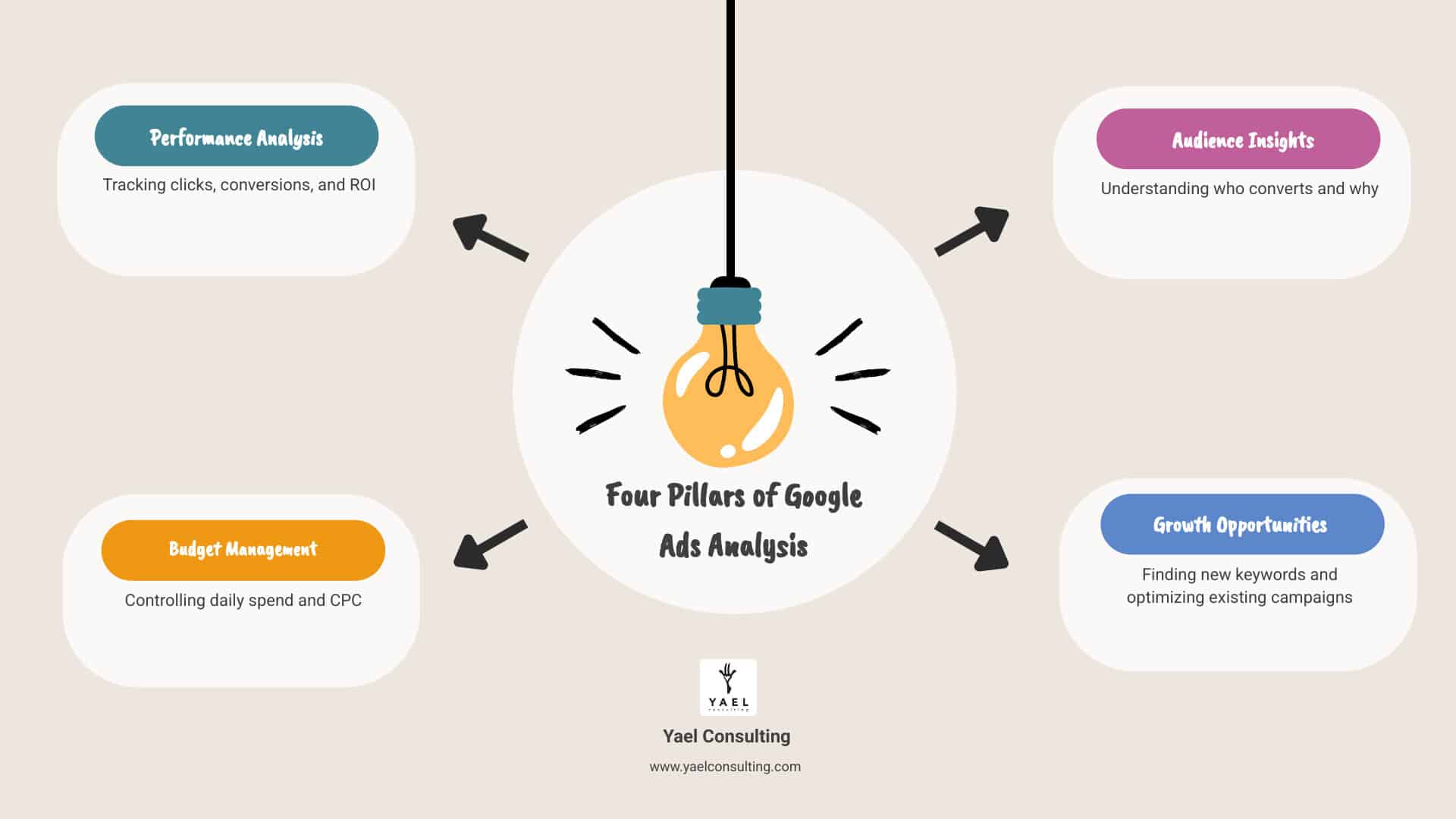
Master Your Campaigns with Google’s Free Built-in Toolkit
Effective Google Ads management requires continuous performance tracking and data-driven decisions. Google provides a robust set of free, built-in Google ads analysis tools to help you understand what’s working, what’s not, and where to optimize. By using these reports, you can move beyond guesswork and ensure every ad dollar contributes to your business goals.
The Foundation: Essential Google Ads Reports
The Google Ads platform is a treasure trove of data. The goal of analyzing this data is to understand performance, identify opportunities, and increase your return on investment (ROI). Several reports are essential for any serious advertiser:
- Search Terms Report: This is one of the most critical Google ads analysis tools, showing the exact queries that triggered your ads. Depending on your keyword match types, ads might show for loosely related searches. Analyzing this report helps you:
- Find new keywords: Find high-performing search queries to add to your ad groups.
- Refine match types: Adjust broad match keywords to phrase or exact match to avoid irrelevant traffic.
- Add negative keywords: Block wasteful search terms that trigger your ads but don’t convert. For example, if you sell “running shoes” and your ad shows for “running nose,” add “nose” as a negative keyword to prevent wasted spend. You can get instructions on how to view and understand the search terms report.
- Day Parting and Hour Parting Reports: These reports reveal when your ads perform best. If you find that your Cost Per Lead (CPL) skyrockets on weekends or conversions drop overnight, you can:
- Adjust bidding: Bid higher during peak hours/days and lower or pause ads during inefficient periods.
- Optimize ad scheduling: Run ads when your target audience is most likely to convert, eliminating wasted spend and improving efficiency.
- Device Reports: Understanding performance on desktops, mobile phones, and tablets is crucial. These reports inform:
- Bid adjustments: Increase bids on high-converting devices and decrease them on underperforming ones.
- Ad and landing page optimization: Tailor your ad copy or landing page for mobile users if data shows a strong performance bias.
- Ad Group Performance: Analyzing performance by ad groups shows which themes, keywords, and ads are performing best. This helps you allocate budget to top performers and optimize underperforming ones.
Measure What Matters: Conversion Tracking & ROI
To know if your ads are profitable, you must measure your return on investment (ROI). This requires robust conversion tracking, a fundamental Google ads analysis tool that records valuable actions (a “conversion”) after an ad interaction. Conversions can be purchases, form submissions, phone calls, or app installs. Without it, you’re paying for clicks without knowing if they generate business.
- Conversion Tracking Setup: Setup varies by conversion type. You can find out how to set up conversion tracking for our website for purchases or sign-ups, find out more about tracking phone conversions for leads, or find out more about setting up mobile app conversion tracking for installs.
- ROI Calculation: Once tracking is in place, you can calculate ROI: (Revenue – Cost of goods sold) / Cost of goods sold. If you spend $5 on clicks for a sale that generates $50 in revenue, you’ve made a $45 profit.
- Key Conversion Metrics: Several metrics provide deeper insights:
- Cost per conversion: The cost for each valuable action.
- Conversion rate: The percentage of ad interactions that result in a conversion.
- Conversion value per cost: A direct measure of ROI within the Google Ads interface.
- Attribution models: Attribution models assign credit for conversions to different ad interactions, helping you understand the full customer journey.
Boost Performance with Quality Score Analysis
Quality Score is a crucial metric in your Google ads analysis tools arsenal that can help you pay less for clicks and appear higher in search results. It’s an estimate (from 1-10) of the relevance of your ads, keywords, and landing page to a user. A higher score is rewarded by Google with:
- Lower Cost-Per-Click (CPC): Highly relevant ads often cost less per click.
- Higher Ad Position: Relevant ads appear higher in search results, boosting visibility.
Quality Score is influenced by three components:
- Expected Click-Through Rate (CTR): The likelihood your ad will be clicked.
- Ad Relevance: How well your ad copy matches the user’s search intent.
- Landing Page Experience: The quality and relevance of your landing page for users who click the ad.
To improve your Quality Score, focus on:
- Keyword and Ad Copy Alignment: Ensure your keywords and ad copy are tightly related to your audience’s search terms and intent. High relevance boosts your expected CTR.
- Optimized Landing Pages: Your landing page must fulfill the ad’s promise. It should be relevant, fast, mobile-friendly, and guide the user toward conversion. A poor landing page experience will lower your Quality Score.
Deeper Insights: Integrating Google Analytics for Free
While Google Ads tracks ad performance, Google Analytics reveals what happens after the click. Integrating the two gives your Google ads analysis tools a superpower: a full view of the customer journey. This free integration provides a privacy-safe way to understand user behavior across devices. Simply link your Google Ads and Analytics accounts and enable auto-tagging to open up a wealth of post-click metrics.

Here’s how this integration transforms your analysis:
- Understanding the Customer Journey: Track user paths from ad click, through your site, to conversion. This helps identify bottlenecks and how different audience segments interact with your website.
- Post-Click Behavior Metrics: Google Analytics shows you what happens after the click:
- Bounce Rate: The percentage of single-page visits. A high bounce rate often signals a mismatch between your ad and landing page.
- Average Session Duration: How long users spend on your site. Longer sessions often indicate higher engagement.
- Pages Per Session: The average number of pages viewed per visit, indicating user interest.
- Audience Segmentation: Segment your audience by demographics, interests, or behavior to understand who your most valuable customers are and refine your ad targeting.
- Business Insights: Connect ad spend to on-site behavior to find which campaigns drive the most valuable traffic, not just the most clicks. You might find a smaller campaign yields more engaged, higher-converting users.
- Improved Reporting: See post-click performance metrics directly in Google Analytics reports for a holistic view of acquisition, behavior, and conversions. Understand how users behaved before converting, not just if they did.
This integration is a no-brainer for any business serious about maximizing its online advertising efforts. It turns raw ad data into actionable intelligence about your customers.
Plan for Success with Free Google Ads Analysis Tools for Forecasting
Predicting ad performance and costs is a major challenge. How much should you spend, and what results can you expect? Google offers free Google ads analysis tools for forecasting that answer these questions with data, not hope.
These tools help you proactively manage spend, anticipate performance, and find growth opportunities before spending a dime.
Forecast Your Budget with Performance Planner
The Google Ads Performance Planner is an indispensable tool that lets you create plans for your ad spend and see how budget changes might affect performance. It’s like a crystal ball powered by Google’s data. You can create a plan for your advertising budget and drive business growth with this tool.
Here’s how it helps you optimize and forecast:
- Budget Allocation: Performance Planner models the optimal budget and bid allocation across your campaigns. It works best when you group campaigns with the same goal, helping you shift funds to maximize overall performance.
- Performance Forecasting: See how budget changes will impact key metrics like clicks, conversions, and cost per action (CPA). This helps you set realistic expectations and adjust your strategy.
- Keyword Opportunities: The tool can suggest new keywords, ensuring you’re not missing out on potential customers.
- Seasonal Trends: Performance Planner accounts for seasonal trends and historical data, providing more accurate forecasts for your business in the USA and other markets.
- Recommendations: The tool can recommend the right budget for your goals, suggest new keywords, and assess the impact of adjusting campaign settings.
Using Performance Planner moves you from reactive adjustments to proactive, data-informed budget management.
Estimate Costs with the Google Ads Budget Estimator
Before planning, it’s crucial to understand potential costs for your industry. The Google Ads Cost Estimator is another free Google ads analysis tool for setting realistic budgets.
This tool provides industry benchmarks to show what similar businesses spend and the results they achieve.
- Industry Benchmarks: See what your industry typically spends on Google advertising. For example, businesses in your sector in New York or Los Angeles might spend between $50 and $200 daily.
- Cost-per-click (CPC): Understand the average CPC for your target keywords. Your bid is the maximum you’ll pay for a click, while your budget is your total spend over a period.
- Average Daily Budget: The tool helps estimate a daily budget based on your desired clicks or conversions.
- Monthly Spending Limit: This is the most you’ll spend on a campaign in a month, calculated by multiplying your average daily budget by the average number of days in a month. It helps you manage your overall ad budget effectively.
By leveraging this estimator, you can start campaigns with a clear understanding of potential costs, avoiding surprises and setting your budget for success.
Level Up Your Strategy with Advanced Analysis Features from Yael Consulting
While Google’s free Google ads analysis tools are powerful, exceptional results require moving beyond the basics with specialized expertise and advanced strategies. At Yael Consulting, our 15+ years of experience and proprietary technology drive significant growth for e-commerce and lead generation clients. Our approach integrates automation and deep analysis, ensuring clients in the USA, Israel, New York, and Los Angeles maintain a competitive edge.
Automate & Optimize with Yael Consulting’s Expert Management
Manual optimization is time-consuming in the dynamic digital advertising landscape. Automation and expert management are critical for efficiency and advanced optimization.
- Task Automation: We automate routine tasks like rule-based bidding, freeing up time for strategy. While Google’s Smart Bidding is powerful, our expert oversight ensures automated strategies align perfectly with your unique business goals.
- Anomaly Detection: Our proprietary systems continuously monitor account performance, identifying unusual spikes or drops that signal a problem or opportunity. This allows for quick action, preventing waste or capitalizing on trends.
- Customizable Reports: We build custom reports and dashboards that consolidate data from various sources, offering clear, actionable insights for tracking Key Performance Indicators (KPIs) and demonstrating ROI.
- Cross-Channel Insights: We integrate Google Ads data with other relevant platforms, leveraging Google Analytics’ comprehensive customer journey insights for more cohesive and effective strategies.
Gain Market Insights with Yael Consulting’s Competitive Analysis Approach
Understanding competitors is critical to a successful Google Ads strategy. While Google’s Ads Transparency Center shows competitor ads, deeper analysis requires specialized tools and expertise.
- Identifying Keyword Opportunities: We go beyond basic research by analyzing competitor strategies to find high-value keywords they’re bidding on. This reveals market gaps we can exploit for our clients.
- Ad Copy Insights: We analyze competitor ad copy to understand their messaging and unique selling propositions. This provides valuable insights for refining our clients’ ad creative to help them stand out.
- Display Network Placements: For clients on the Display Network, we analyze where competitors place their ads. This helps identify high-performing placements and avoid inefficient ones.
- Strategy Refinement: Our competitive analysis isn’t about imitation; it’s about identifying strengths, weaknesses, and market gaps to refine our clients’ strategies for maximum profitability.
Refine Your Message with Ad Copy & Landing Page Testing
Great keywords won’t convert if your ad copy and landing pages fall flat. Continuous testing and optimization are paramount.
- A/B Testing with Google Ads Experiments: We use Google’s “Experiments” feature, a powerful Google ads analysis tool, for A/B testing ad copy, bidding strategies, and landing pages. These controlled tests identify which variations improve CTR, conversion rates, and CPA.
- Ad Copy Insights: We continuously analyze ad performance data to gain insights into which messaging resonates most with your target audience, allowing us to refine ad creative for relevance and impact.
- Landing Page Optimization (CRO): The landing page experience is crucial for conversion. We work with clients to optimize their pages for speed, relevance, and user experience, ensuring they effectively guide visitors toward conversion and maximize the value of every ad click.
Frequently Asked Questions about Google Ads Analysis
What are the primary goals of analyzing Google Ads data?
The primary goals are to maximize efficiency and profitability. We aim to:
- Increase ROI: Allocate budget to the most profitable campaigns and keywords.
- Reduce Wasted Spend: Eliminate irrelevant clicks by refining keywords and targeting.
- Find Growth Opportunities: Uncover new keywords, audiences, and campaign strategies.
- Understand Customer Behavior: See how users interact with your site post-click to understand their journey.
- Improve Campaign Performance: Continuously optimize bids, budgets, ad copy, and targeting.
Essentially, the goal is to ensure every dollar spent on Google Ads is working as hard as possible for your business.
What’s the difference between ad optimization and campaign optimization?
While related, they focus on different levels of your advertising strategy:
- Ad Optimization: Focuses on the creative elements of the ad itself—testing headlines, descriptions, and calls-to-action to improve metrics like Click-Through Rate (CTR) and relevance.
- Campaign Optimization: Involves the “big picture” strategy, including budget, bidding, audience and geographic targeting (e.g., focusing on New York or Los Angeles), ad scheduling, and keyword match types to maximize overall efficiency.
Both are interdependent; great ad copy can’t save a poorly targeted campaign, and a perfect campaign will fail with weak ads.
How does conversion tracking help make the most of an ad budget?
Conversion tracking is vital because it connects ad spend directly to business results. Here’s how:
- Measures True Value: It connects ad clicks to tangible business results like sales or leads.
- Identifies Winners: Pinpoints the exact ads, keywords, and campaigns that are most effective.
- Focuses Budget: Allows you to shift spending to high-performing areas instead of guessing.
- Enables Smart Bidding: Open ups automated bidding strategies that optimize for conversions.
- Drives Profitability: Ensures your ad spend is directly contributing to a positive ROI.
By measuring conversions, you gain the clarity to make informed decisions, eliminate waste, and ensure your ad budget is working to generate profit.
Turn Your Analysis into Action and Profit
We’ve explored a powerful array of free Google ads analysis tools, from Search Terms reports to Performance Planner and Google Analytics integration. Used correctly, these tools provide the foundation to reduce wasted spend, boost conversions, and maximize ROI.
Continuous analysis is the secret weapon for making data-driven decisions that turn clicks into customers.
If you’re ready to stop guessing and start growing, we’re here to help. At Yael Consulting, we transform Google Ads performance for businesses in the USA, Israel, New York, and Los Angeles. Our unique approach combines 15+ years of expertise with proprietary technology to find profit leaks others miss.
Don’t let valuable insights gather dust. Get your free, actionable Google Ads analysis today and let us show you how to turn your data into profit.