

Why Your E-commerce Google Ads Strategy Can Make or Break Your Business
An E-commerce Google Ads strategy is the systematic approach to using Google’s advertising platform to drive qualified traffic, increase sales, and maximize profitability for online stores. Here’s what a winning strategy includes:
Core Components of an Effective E-commerce Google Ads Strategy:
- Full-Funnel Campaign Structure – Target customers at every stage from awareness to retention
- Optimized Product Feeds – Accurate, keyword-rich product data in Google Merchant Center
- Smart Bidding with Human Oversight – Balance AI automation (Target ROAS, Maximize Conversion Value) with manual adjustments
- Strategic Campaign Types – Performance Max, Standard Shopping, Search, and Remarketing campaigns working together
- Conversion Tracking Excellence – Transaction-specific tracking to measure true ROAS
- Continuous Optimization – Regular testing of ad copy, bids, audiences, and landing pages
For many e-commerce businesses, Google Ads is a foundational revenue channel, driving a significant portion of all e-commerce revenue. The platform delivers buyers with genuine purchase intent, as over half of consumers use search results when making buying decisions.
But here’s the challenge: most businesses are leaving money on the table. They waste budget on irrelevant clicks, rely too heavily on AI, or launch advanced campaigns without the proper foundation.
The gap between a 4-10X ROAS and barely breaking even isn’t about spending more—it’s about strategic execution. It’s knowing which campaigns to launch, when to launch them, and how to structure your account so Google’s AI works for you, not against you.
The opportunity is massive, with Google Shopping ads generating over 85% of retail paid search clicks. But capturing that opportunity requires more than just turning on campaigns and hoping for the best.
I’m Lior Krolewicz, a Google Ads expert with over 15 years of experience generating millions in profitable revenue for online stores. In this guide, I’ll share the exact frameworks and tactics that separate profitable advertisers from those spinning their wheels.
The Foundation: Setting Up Your E-commerce Store for Google Ads Success
Before launching a campaign, we must ensure our e-commerce store is a well-oiled machine ready to convert traffic. Think of it as preparing the ground before planting seeds. This foundational work is critical for any successful E-commerce Google Ads strategy.

This section focuses on essential store prerequisites, technical setup, product feed excellence, and conversion tracking accuracy. Without these, we’re throwing money into a digital black hole.
Store & Technical Readiness: Before You Spend a Dollar
Spending ad budget to send customers to a slow, clunky website is a recipe for failure. Store and technical readiness are non-negotiable.
First, ensure your store has sensible unit economics. Knowing your profit margins, competitive pricing, and average order value helps determine a realistic customer acquisition cost.
Next, your website’s user experience (UX) must be top-notch. This includes:
- Mobile Optimization: Your site must be fully responsive for a seamless mobile shopping experience.
- Fast Loading Times: Slow pages lead to high bounce rates. Use Google’s Core Web Vitals to evaluate and improve your site’s user experience.
- Clear Calls-to-Action (CTAs): Buttons like “Add to Cart” and “Buy Now” must be prominent and compelling.
- Essential Infrastructure: Implement robust systems for email capture, abandoned cart recovery, and welcome series to support long-term customer retention.
Finally, secure a sufficient testing budget. While you can start with as little as $10/day, an ideal minimum is $1,000/month for meaningful data. This allows Google’s AI to learn and enables informed optimization decisions. Also, conduct market analysis to understand your competitive landscape.
The Engine Room: Conversion Tracking & Product Feeds
If your website is the storefront, conversion tracking and product feeds are the engine room of your E-commerce Google Ads strategy. Without accurate tracking, you’re flying blind.
Correctly set up conversion tracking using Google Tag Manager to implement your Google tags. Ensure they fire accurately on key actions, like purchases, and customize settings like the conversion window and attribution models to fit your business.
Simultaneously, set up Google Analytics 4 (GA4) with improved e-commerce tracking. Linking your Google Ads account with GA4 allows for deeper insights and better audience segmentation.
For any e-commerce business, the Google Merchant Center is indispensable. It’s a free Google tool where you upload your product feed—a comprehensive catalog of all your products.
Product feed excellence is paramount. A high-quality feed includes:
- Detailed Product Descriptions: Keyword-rich descriptions help Google understand your products.
- High-Quality Images: Clear, visually appealing images (ideally 800x800px or larger) are crucial.
- Accurate Pricing and Availability: Mismatches between your feed and website can lead to ad disapprovals.
- GTINs and MPNs: Global Trade Item Numbers (GTINs) and Manufacturer Part Numbers (MPNs) improve product identification and ad relevance.
Create and connect your product feed, for instance, by registering a Google Sheet in Merchant Center. Set an upload schedule to keep your feed fresh, as Google requires submission at least every 30 days.
Building Your Full-Funnel E-commerce Google Ads Strategy
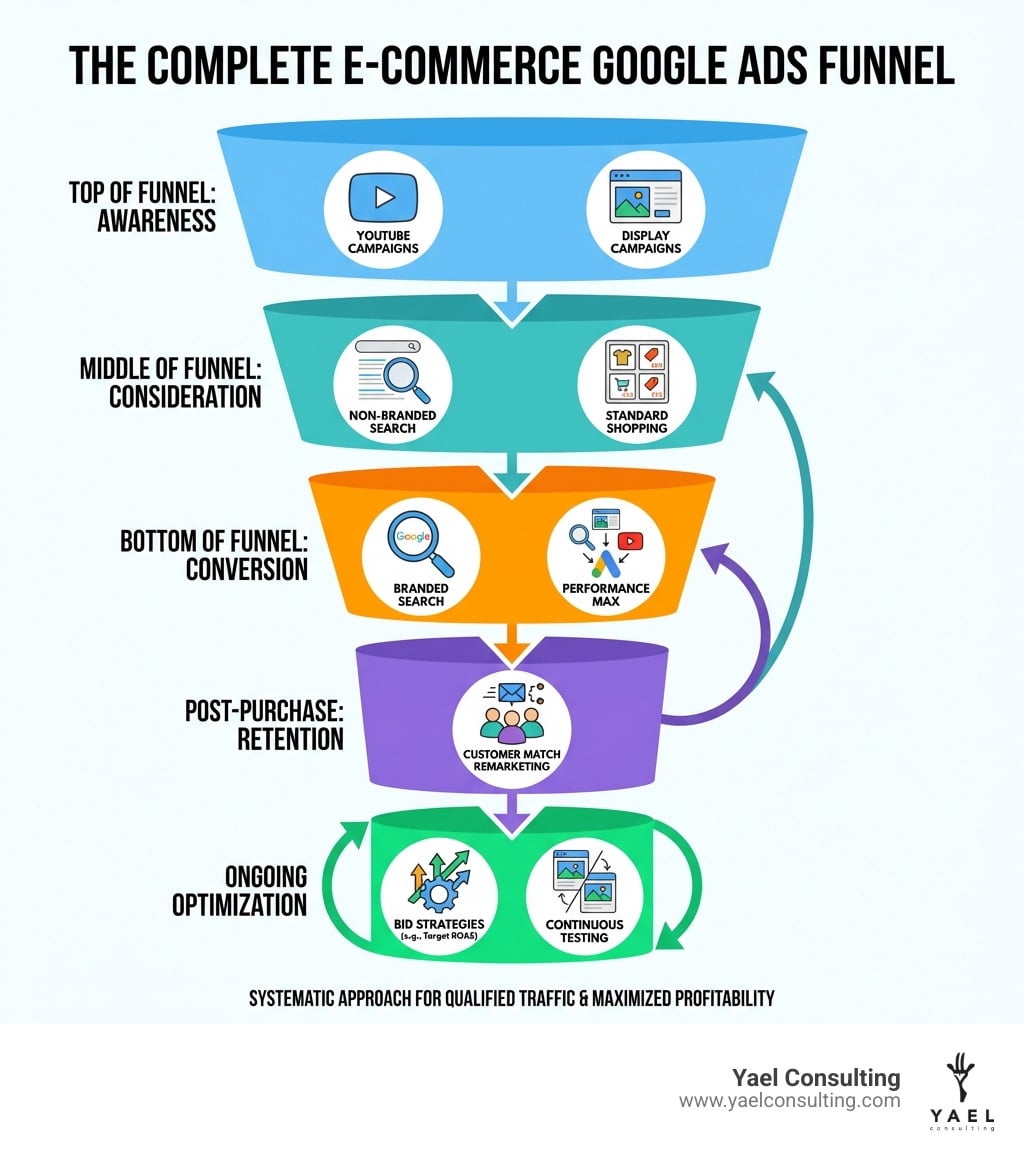
A successful E-commerce Google Ads strategy nurtures potential customers through their entire buying journey, from initial awareness to repeat purchases. This requires a full-funnel approach, tailoring your message and campaign types to where the customer is in their decision-making process.
Our strategy will integrate varied audience targeting, intentional keyword use, and aligned ad creative for each stage. Budget allocation will also shift based on the funnel stage, influenced by market competitiveness, brand awareness, and overall KPIs.
Top of Funnel (Awareness): Reaching New Customers
At the top of the funnel, the goal is to introduce your brand to a broad audience. For awareness, we leverage visual campaigns like YouTube Ads, Google Display Ads, and Demand Gen campaigns. With YouTube reaching over 1 billion users, video is a powerful tool for storytelling. We target broad Affinity Audiences and Custom Segments with captivating visuals and strong brand messaging to make a memorable first impression.
Middle of Funnel (Consideration): Capturing Active Shoppers
In the consideration phase, customers are actively researching and comparing options. Our aim is to position our products as the best choice. Key campaigns include Non-branded Search targeting generic keywords (e.g., “wireless headphones”) and Standard Shopping Ads, which visually showcase products in search results. We refine targeting with In-market Audiences and Custom Intent Audiences to reach active shoppers. Ad copy should highlight features, benefits, and competitive advantages.
Bottom of Funnel (Conversion): Closing the Sale
This is where we convert interested prospects into customers. Users at this stage have high purchase intent. Our primary focus is on Branded Search Campaigns targeting our brand name, which often yield high ROAS. We also use Google’s AI-powered Performance Max campaigns to maximize conversions across all channels. Dynamic Remarketing shows personalized ads to re-engage previous website visitors, while Remarketing Lists for Search Ads (RLSA) lets us tailor bids for past visitors. Ad copy should be direct, with strong CTAs and urgency.
Post-Purchase (Retention): Driving Lifetime Value
Our relationship with a customer doesn’t end at the sale. Many e-commerce businesses survive off of repeat purchases, making customer lifetime value (LTV) a key metric. For retention, we use Customer Match Lists by uploading first-party data from previous purchasers to create targeted campaigns. We can run Cross-selling & Up-selling Ads for complementary products or use YouTube & Display Remarketing to keep our brand top-of-mind. The goal is to transform one-time buyers into loyal, repeat customers.
Mastering Campaign Types & Advanced Structures
Understanding the specific roles of Google Ads campaign types and how they interact is fundamental to a sophisticated E-commerce Google Ads strategy. This section digs into structuring campaigns for maximum impact, including advanced techniques like the “Feeder” strategy.
Performance Max vs. Standard Shopping: The “Feeder” Strategy
Google’s advertising landscape is constantly evolving with automated campaigns like Performance Max. While powerful, they also introduce new challenges.
| Feature | Performance Max (PMax) | Standard Shopping Campaigns |
|---|---|---|
| Control | Less control over individual keywords, placements, and bidding. AI-driven. | More granular control over product groups, bids, and negative keywords. Manual or automated. |
| Reach | All Google channels (Search, Display, YouTube, Gmail, Find, Maps). | Primarily Google Search and Shopping tab. |
| Inputs | Product feed, assets (images, videos, headlines), audience signals. | Product feed, product groups, negative keywords. |
| Automation | Highly automated bidding, targeting, and ad creation. | Can be manual or use automated bidding, but core structure is manual. |
| Best Use Case | Maximizing conversion value across all channels, especially with sufficient conversion data. | Granular control over specific products, testing, and managing niche product groups. |
While Performance Max campaigns use AI to optimize delivery, they can sometimes hit a scaling ceiling, leading to diminishing returns. This is where the “Feeder” strategy comes in, a clever workaround to PMax limitations.
The “Feeder” strategy uses Standard Shopping campaigns to “feed” high-intent traffic to Performance Max. Here’s how it works:
- Aggressive Standard Shopping: We set up Standard Shopping campaigns with a slightly more aggressive Target ROAS (e.g., 400%) than our Performance Max campaigns (e.g., 500%). This makes the Standard Shopping campaign more likely to capture initial, high-intent clicks.
- PMax as Remarketer: Performance Max then acts as a remarketing tool, converting these “warmed-up” audiences. Google’s ad rank system will prioritize the more aggressive Standard Shopping campaign, leaving PMax to focus on converting those who have already shown interest.
This approach allows us to regain some control, especially when hitting scaling challenges with PMax alone. This strategy has helped brands significantly increase sales by restructuring their campaigns.
The 8-Step Growth System for Scalable Accounts
To build a truly scalable E-commerce Google Ads strategy, we follow a proven 8-step growth system. This full-funnel approach has generated over $57.2M in revenue for a client with a 10.98X ROAS.
- Performance Shopping Campaigns: Segment Standard Shopping campaigns into tiers: Superstars (top performers), A-Players (solid performers), Reserves (potential), and Benched (underperformers) for precise budget allocation.
- Branded Search Campaign: Create a dedicated campaign for your brand name using a target impression share bid strategy to ensure visibility for high-intent searches.
- Branded Shopping Campaign: This Standard Shopping campaign focuses on branded products, using a low campaign priority and a very high tROAS to capture high-value searches.
- Non-branded Search Campaigns: Target generic keywords, starting with exact and phrase match only for new accounts. Introduce broad match cautiously once you have 30-50 conversions in 30 days.
- Non-Branded DSA (Dynamic Search Ads) Campaigns: Dynamic Search Ads (DSA) use machine learning to dynamically generate ads for long-tail searches. Exclude non-commercial pages to keep campaigns focused.
- Dynamic Remarketing Campaign: Target users who viewed products but didn’t purchase. Use audiences like “Product view, No purchase, Last 30 days” and set a frequency cap to avoid ad fatigue.
- YouTube Remarketing Campaign: Use engaging video assets to re-engage users who abandoned carts or viewed specific products.
- YouTube Shorts Campaign: Once the funnel is optimized, use YouTube Shorts for top-of-funnel cold awareness, applying product feed filters to showcase only top-performing products to new audiences.
Crafting a Winning E-commerce Google Ads Strategy with Keywords
Keywords bridge customer intent and your products. A robust strategy relies on meticulous keyword management. We use various keyword research tools like Google Keyword Planner, SEMrush Keyword Magic, and Ubersuggest to uncover relevant terms aligned to the funnel stage:
- Awareness/Consideration: Broader, generic terms (e.g., “men’s running shoes”).
- Consideration/Conversion: Specific, intent-driven terms (e.g., “Nike Air Max 270 black”).
We strategically use keyword match types (Broad, Phrase, Exact) to control reach. Crucially, we employ negative keywords to filter out irrelevant searches (e.g., adding “used” as a negative if you sell new products). Regularly reviewing search query reports is an ongoing process that refines targeting and prevents wasted ad spend.
Continuous Optimization: Maximizing Your ROAS
Launching campaigns is just the beginning. The true art of a successful E-commerce Google Ads strategy lies in continuous optimization. This iterative process of monitoring, analyzing, and refining campaigns is what drives sustained growth and maximizes Return on Ad Spend (ROAS).
Smart Bidding & AI: Finding the Balance with Human Oversight
Google Ads is increasingly powered by AI, particularly through smart bidding strategies. These AI-driven features can be incredibly powerful, but complete reliance on AI without manual oversight is a ‘no-go’. We believe in balancing AI’s efficiency with expert human judgment.
Google offers various bidding strategies:
- Target ROAS: Automatically sets bids to get the most conversion value for your target ROAS. It’s often recommended for e-commerce, and we typically start with a tROAS of 150% for new campaigns.
- Target CPA: Aims to get as many conversions as possible at or below a specific Cost Per Acquisition.
- Maximize Conversion Value: Focuses on maximizing the total value of conversions within your budget.
We use automated bidding when we have sufficient conversion data (ideally 30-50 conversions in the last 30 days). For new campaigns, we might start with manual CPC to gain control, then transition to smart bidding. Our human oversight ensures the AI is optimizing towards true business goals.
Key Metrics That Matter: Tracking Your Path to Profitability
To optimize effectively, we monitor several key performance indicators (KPIs):
- Return on Ad Spend (ROAS): The most critical metric for e-commerce, telling you the revenue generated for every dollar spent. For Google Shopping ads, we routinely see 400-1,000% (or higher) ROAS.
- Click-Through Rate (CTR): The percentage of people who see your ad and click it. A high CTR indicates ad relevance.
- Cost Per Click (CPC): The average amount you pay for each click, which can vary widely by industry.
- Conversion Rate: The percentage of visitors who make a purchase.
- Impression Share: The percentage of times your ads were shown versus how often they could have been shown.
- Quality Score: Google’s rating of your keyword, ad, and landing page relevance. A lower quality score dings ad efficacy, leading to higher CPCs and lower ad rankings.
Advanced Optimization for Your E-commerce Google Ads Strategy
Beyond the basics, we employ several advanced optimization techniques:
- Responsive Search Ad Testing: We provide Google with multiple headlines and descriptions, allowing its AI to find the best combinations. We regularly review reports to identify top performers.
- Ad Asset Optimization: We leverage ad “assets” (formerly extensions) like sitelinks, callouts, and structured snippets to maximize ad real estate.
- Landing Page A/B Testing: We constantly test landing page variations to improve conversion rates, using metrics like Core Web Vitals to guide improvements.
- Ad Scheduling (Dayparting): We analyze data to identify the most profitable days and times to run ads, applying geographic bid adjustments or dayparting to maximize efficiency.
- Seasonal and Event-Based Campaigns: We capitalize on peak shopping seasons (e.g., Black Friday) with dedicated campaigns, custom ad copy, and adjusted budgets.
Frequently Asked Questions about E-commerce Google Ads
Here are some of the most common questions we hear from e-commerce businesses looking to master their Google Ads strategy.
How much should I budget for Google Ads?
This is the million-dollar question, and the answer is “it depends!” However, we can provide some guidelines:
- Minimum Budget: For a bare minimum test, we recommend starting with $10/day for a month per campaign to give Google’s AI enough data to learn.
- Ideal Starting Budget: For more meaningful results, an ideal minimum is $1,000/month. This allows for broader testing and more consistent data.
- Budget Allocation: Budget allocation across the funnel depends on market competitiveness, brand awareness, and your overall budget. If your budget is limited, you might prioritize bottom-funnel campaigns for immediate ROAS.
- Scaling Based on Performance: As campaigns become profitable, we scale the budget strategically. For new campaigns, we often set our tROAS to 150% and adjust as we gather data.
What are the most common Google Ads mistakes for e-commerce?
We’ve seen our fair share of pitfalls. Here are the most common mistakes that derail performance:
- Inconsistent Conversion Tracking: If tracking is broken or inaccurate, you can’t measure ROI or optimize effectively, hindering your ability to calculate returns.
- Poor Quality Score: A low Quality Score means you pay more for clicks and your ads show less often. It dings ad efficacy and can even lead to ad disapproval.
- Budget Wastage on Broad Keywords: Relying too heavily on broad match without a strong negative keyword list leads to ads showing for irrelevant searches. This wastes budget due to inadequate keyword research and poor targeting.
- Ineffective Ad Copy: Ads with weak value propositions, unclear CTAs, or a lack of testing fail to attract clicks and engage users.
- Neglecting Negative Keywords: Failing to consistently add negative keywords is a common mistake. As Chelsea Cohen, Co-Founder of SoStocked, puts it, “Take advantage of the negative keywords function. This feature makes it so you don’t appear for given keywords.”
- Poor Landing Page Experience: If your landing pages don’t match the user’s intent or offer a poor user experience, even the best ads will fail to convert.
How long does it take to see results from Google Ads?
Patience is key. Google Ads isn’t an instant magic wand, but it delivers results faster than many other channels.
- Initial Data Collection (Learning Period): The first 1-2 months are Google’s learning phase, especially for automated bidding. We might start with “Maximize conversion value” for Months 1 & 2 to gather data.
- Initial Results: You can typically start seeing initial results like traffic and clicks within 1-2 months.
- Optimization for Profitability: Consistent profitability and high ROAS usually take 3+ months of continuous optimization. By Months 2 & 3, we can apply a Target ROAS strategy.
- Factors Influencing Timeline: The timeline varies based on budget, industry competitiveness, and sales cycle length. To effectively use smart bidding, you need at least 30-50 conversions in the last 30 days.
From Clicks to Profit: Let’s Build Your Strategy
We’ve explored the intricate world of E-commerce Google Ads strategy, from building a solid foundation to mastering campaign types and continuously optimizing for profit. The key takeaways are clear: a structured, full-funnel approach, balancing AI with human oversight, and relentless testing and optimization are paramount.
The digital marketplace is dynamic, and staying ahead requires not just knowing the tools, but understanding how to wield them strategically. This is where expertise makes all the difference.
At Yael Consulting, we specialize in driving significant sales and profit growth for e-commerce businesses in the USA, New York, Los Angeles, and Israel. We offer one-client-per-market exclusivity, proprietary technology, and direct CEO involvement, ensuring your strategy is truly custom-custom and exceptionally executed.
Ready to transform your clicks into carts and significantly boost your e-commerce revenue? We invite you to experience our expertise firsthand.
Get your free, actionable Google Ads analysis today. We guarantee you’ll walk away with valuable insights, or we’ll donate $100 to your charity of choice. It’s our way of showing you the Yael Consulting difference.